¶ Local-push Plugins & Applications
These 21 applications run on a computer or NAS and send content to NOTE4 over the LAN. They use the official local-push capability or a host built around it. A program does not need a ZECTRIX Cloud API Key merely to connect by local push; optional weather, speech or AI services may need their own credentials. NOTE4C support must not be assumed.
Choose the project-specific operating system and dependencies. Keep the host available when updates are required, and avoid multiple clients competing for one device. Public source is not the same as a ready-to-install package.
Plugin overview · Cloud API plugins · Local Push Guide · 中文
Catalog synchronized on 2026-11-17. Individual review dates and verification limits are retained; links lead to each project’s current instructions.
| Project | Author |
|---|---|
| Two-Digit Multiplication Drill | hadronliu |
| Menu Board | KarenGu |
| Amb Ambient Machine | 抒一的有限集 |
| Habit · Habit Tracker | mjrc |
| WeRead Reading Companion | hadronliu |
| InkDeck | Xuanyu (悬雨) |
| SlimFit · Weight-management Check-ins | luyk |
| Sports Board Pro | Taqula lee |
| Qimen Dunjia Chart | 灵翎 |
| WorkBuddy Pet | 消逝の青春 |
| EInk-Push | moyubyte |
| InkHub | strincake |
| Mowen Desk | hadronliu |
| MoDu · WeRead Ink | hadronliu |
| Personal AI Assistant Status Display | JerryLiu |
| Manila Icon Weather | wuyinyuanye |
| NAS Gallery | itopinion |
| Liquid Glass Weather | itopinion |
| Vocabulary | itopinion |
| Codex Pet | itopinion |
| AI Daily | itopinion |
¶ Two-Digit Multiplication Drill
hadronliu · NOTE4 · MIT
NOTE4 shows the problem. Hold confirm to answer aloud, then release for recognition and grading on a Mac. Practice two-digit multiplication or squares with unique questions in each set. Unclear answers prompt a retry.
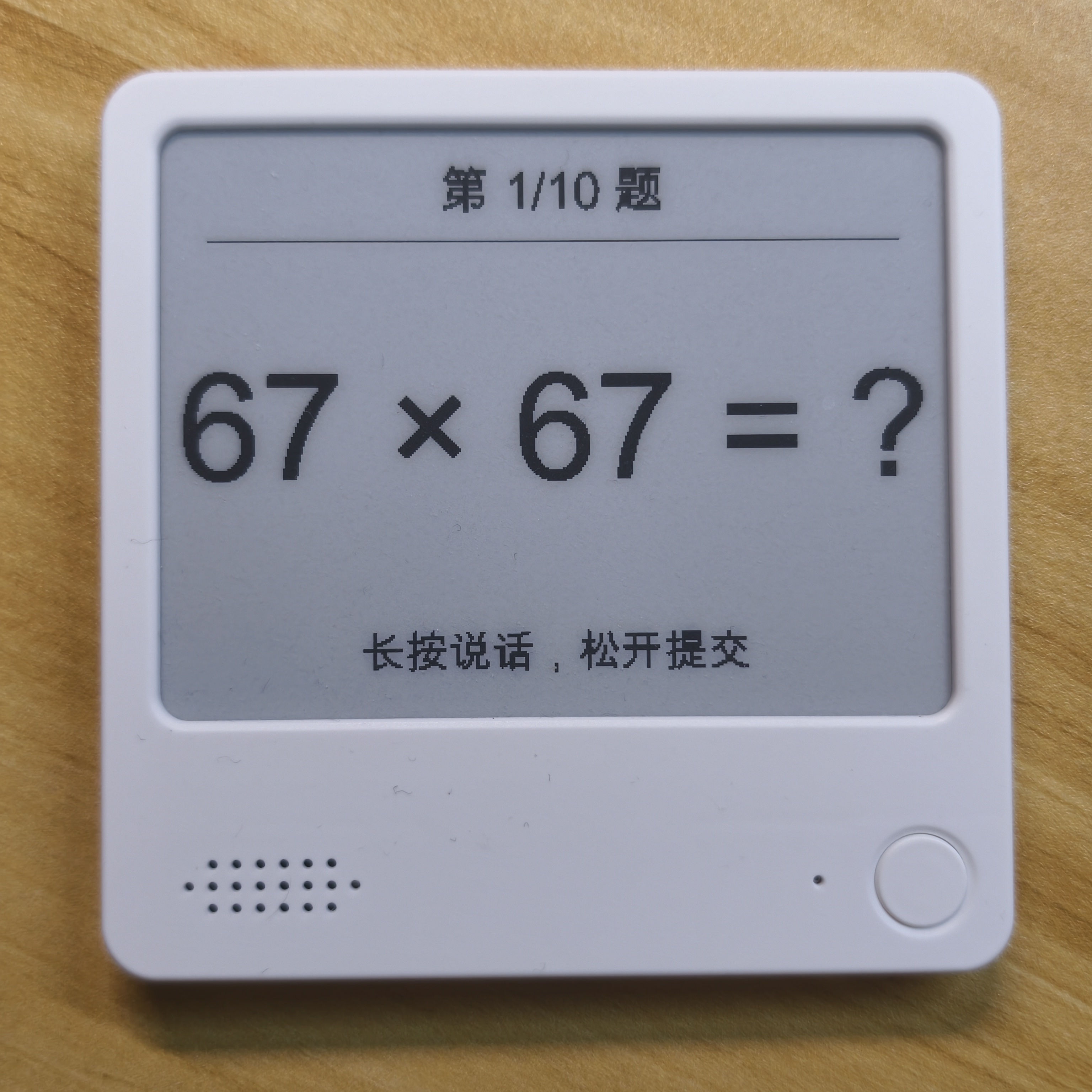
Author-provided NOTE4 photo showing a squares practice question. GitHub

NOTE4 monochrome · Chinese firmware 3.7.5 · Apple silicon Mac · Rust, Python and official Local Push SDK · Same LAN
- Three multiplication difficulties and a squares mode, with no repeated questions per set
- Recognizes Chinese numbers spoken as whole values or digit by digit, with retries for ambiguous speech
- Stores results in SQLite on the Mac and resumes unfinished sessions
- Prepare the Mac and SDK — Place the SDK at ../repos/zectrix-local-push-sdk relative to the project directory, then run cargo build --features device as documented.
- Configure local speech recognition — Create a Python virtual environment and install mlx-audio. The app looks for ../asr-env/bin/python by default, or accepts an interpreter via --python. First use downloads a roughly 2 GB Qwen3-ASR model.
- Connect NOTE4 and start practicing — Keep the Mac and NOTE4 on the same LAN. Start drill_device with the device IP as documented and return NOTE4 to its home screen. Hold confirm to speak, release to submit, and short-press for the next problem.
¶ Menu Board
KarenGu · NOTE4 · MIT
Send a weekday meal plan and a categorized shopping list to NOTE4. The current day is highlighted automatically. Plan meals around school menus and ingredients on hand, and use the device buttons to flip or refresh pages.
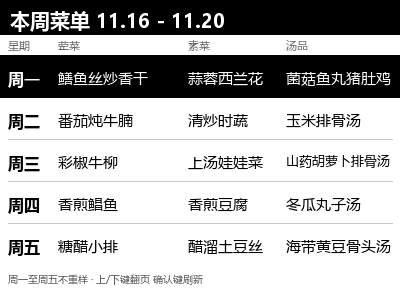
Author-provided 400×300 weekday menu example, with the current day highlighted in white on black. GitHub

NOTE4 monochrome · Chinese firmware 3.7.5 · Local Push SDK 0.2.0 · Rust stable, CMake, Python 3 + Pillow · Same LAN
- Two 400×300 16-level grayscale pages for meals and shopping, with the current-day highlight updated at midnight
- Up/down flips pages and confirm re-reads and refreshes the current page
- The planner prioritizes ingredients on hand and consults the school menu to avoid repeating main ingredients
- Prepare the build environment — Place Local Push SDK 0.2.0 beside the project as documented. Install Rust stable, CMake, Python 3 and Pillow, then run cargo build --release in the project directory.
- Generate the menu and shopping list — Run python render_cards.py to generate the sample. For weekly updates, fill in school.txt and stock.txt, then run python weekly_gen.py followed by python render_cards.py to update the two images in pages.
- Send to NOTE4 — Enable standby Wi-Fi on NOTE4 and keep the host and device on the same LAN. Follow the README to run cargo run --release -- pages gray16 and keep the program running.
¶ Amb Ambient Machine
抒一的有限集 · NOTE4 · MPL-2.0
Generate ambient music on a computer or NAS and play it on NOTE4 over the LAN. Choose from eight generative soundscapes and four field recordings, with preset switching and five volume levels on the device.

Author-provided 400×300 grayscale cover for the Garden preset. The SDK converts it during push. GitHub

NOTE4 monochrome · Firmware 3.7.5 · Local Push SDK 0.2.0 · Computer or NAS on the same LAN
- Generates 300-second audio segments by default and prepares the next one in the background
- Adjust synth parameters and check device status on the web; press confirm to switch presets and up/down to change volume
- Supports 16- or 4-level grayscale covers through SDK conversion
- Build and download recordings — Follow the README to clone with submodules. Prepare Rust, a C/C++ toolchain, CMake, Python 3.10+, curl and ffmpeg/ffprobe, then build the synth and manager and use the repository script to download and verify recordings.
- Start the manager and connect NOTE4 — Save the device LAN address and enable Wi-Fi in standby as documented. Start the manager and then the web UI, and choose Connect to manager on NOTE4. Keep the default web port, 8765, within a trusted LAN.
- Adjust the sync interval — The author recommends 180 minutes, or 720 minutes for longer continuous playback. Disabling sync can prevent sync-related interruptions, but online content may stop updating.
¶ Habit · Habit Tracker
Author: mjrc · NOTE4 · Local application · Apache-2.0
Manage habits on the web and check in with NOTE4 buttons. Choose a single card or an adaptive home screen with 1–4 pinned habits, then review period completion, a 12-week heatmap, streaks and habit scores.
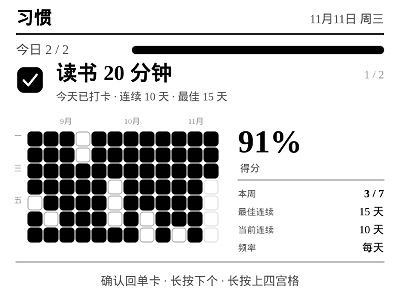
Author-provided 400×300 habit detail render with demo history; not a device photograph. GitHub

NOTE4 monochrome display · Node.js 22+ / npm · Computer, NAS or Raspberry Pi · Same LAN · Host stays running
This fork of EInk-Push 0.4.4 includes both the hub and Habit; no separate EInk-Push installation is needed. It connects to NOTE4 over LAN v1 without replacing firmware. NOTE4C support is not declared. Check dependencies and device behavior on your own host.
- Single-card or adaptive layouts for 1–4 pinned habits
- Weekly, monthly and quarterly targets and completion counts
- 12-week heatmap, current/best streaks and habit scores
- Create/edit habits, manage pinned cards, preview and push from the web
- Confirm to check in or undo on the home screen; switch detail and grid modes on-device
- Install this complete repository:Install Node.js 22+ and npm, clone Ren-Chang/EInk-Push and run npm install in its directory. The repository already includes the hub and Habit; you do not need to download upstream EInk-Push separately.
- Choose a launch mode:npm start loads Habit only and redirects http://localhost:8080/ to /apps/habit/. Use npm run start:full to include the six upstream apps alongside Habit. Create habits, set targets and pins, and inspect the 400×300 web preview first.
- Configure NOTE4 and start checking in:The initial web password is helloworld; change it on the Device page after signing in. Keep NOTE4 and the host on the same LAN. Save the device address at /device or use npm start -- --device . Stop other device clients before pushing, then verify check-in with confirm, detail with long-up and the next habit with long-down.
How does this relate to EInk-Push? This fork of moyubyte/EInk-Push 0.4.4 adds Habit as an app. Habit-only mode is the default; full mode also loads Today, Vocabulary, What to Eat, Life Guide, Pet and Divination. It retains upstream attribution under Apache-2.0.
How do the device buttons work? On the home screen, short-confirm toggles today’s check-in, long-up opens detail and long-down moves to the next habit. In detail, confirm returns to a single card, long-up opens the grid and long-down opens the next habit’s detail. Short up/down remain hub-level app switching.
Where is data stored? Does it need a cloud API? Habits and check-ins are saved in data/habit/state.json; device settings are in data/config.json. Preserve them during backups and upgrades. Habit pushes through the hub over the LAN without a ZECTRIX Cloud API key; other apps in full mode may need their own service settings.
Does the preview show real habit records? The preview is the author’s 400×300 detail render using demo history, not real personal records or a device photograph. We reviewed documentation, source and button handling, but did not independently test different NAS systems, computers or devices.
Reviewed: 2026-11-11. Source: a1fc60dea19d6b5ae8e4de81a9a3e51e92210d31.
¶ WeRead Reading Companion
Author: hadronliu · NOTE4 · Local application · MIT
Sign in to WeRead on your Mac and read book pages on NOTE4, using its buttons to turn pages. E-paper contrast and margins are optimized, with monochrome and grayscale output.
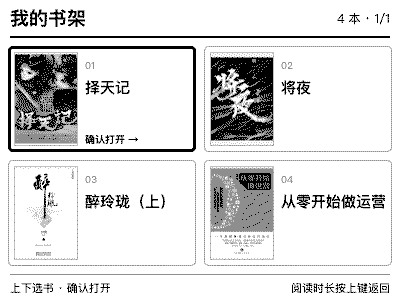
Four-level grayscale bookshelf from the locally adapted app, exported from the actual device-push data; not a device photograph. The bookshelf was added locally and is not included in the reviewed upstream download. GitHub
Mac · Node.js 18+ / npm · Rust stable / CMake / Xcode Command Line Tools · NOTE4 on the same LAN
The author has tested macOS only, for NOTE4, not NOTE4C. The bundled SDK is 0.1.0 and its manifest lists firmware 3.7.2. Connection and four-level grayscale push were verified on the current Mac and NOTE4; other systems and firmware versions require separate checks.
- Browser QR login with a persistent local session
- Down for next page, up for previous page, confirm to refresh
- 400×300 reading canvas with mono / gray4 / gray16 output
- Setup and launch scripts; attempts to reopen the last reading page
- Prepare your Mac and dependencies:Install Node.js 18+, npm, Rust stable, CMake and Xcode Command Line Tools per the README. Clone the repository and run bash scripts/setup.sh to download Chromium and compile the app. Initial setup needs internet access; this is not a ready-to-run .app.
- Configure NOTE4 and start:For first-time setup, copy .env.example to .env and set ZECTRIX_IP; preserve existing settings. Keep the Mac and NOTE4 on the same LAN, close other device clients, then run bash scripts/start.sh. Defaults are mono with prefetch disabled to avoid advancing pages early.
- Sign in, choose a book and test paging:Scan the QR code in the browser, open a book, and test page buttons and refresh. To change books, press ⌘L in the same browser, open https://weread.qq.com, close the old book tab, open the new book and press confirm. Close the browser or press Ctrl+C to stop.
How is this different from MoDu / WeRead Ink? This is a separate project by the same author. WeRead Ink shows reading time and progress; this app displays book text with physical page-turn buttons. It uses QR login and needs neither a WeRead API key nor a ZECTRIX Cloud API key.
How are login data and reading progress handled? Cookies stay in browser-controller/.user-data/ on your Mac; screenshots and the last book URL are also stored locally. Do not upload them. WeRead handles cloud progress; this tool does not guarantee real-time cross-device consistency or implement automatic book switching and progress-conflict resolution.
What are the current limitations? The Mac, browser and app must remain running while reading. Disconnection may require restarting the app; website changes and special layouts may affect rendering. The image shows a bookshelf added locally, exported from actual NOTE4 four-level grayscale push data, not a device photo. The reviewed upstream download does not include this bookshelf feature.
Reviewed: 2026-11-10; preview updated: 2026-11-11. Source: 9aec1cdfc95b8db66791b19003c607888fa5c8e5.
¶ InkDeck
Author: Xuanyu (悬雨) · NOTE4 · Local application
A desktop content scheduler for NOTE4, coordinating multiple channels with priorities, display timing and idle fallback. Supports Python plugins, with weather/clock, a focus timer and a WorkBuddy status daemon using its local API.
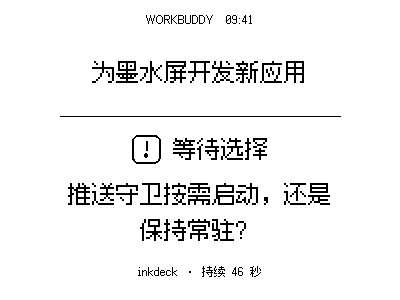
400×300 application screen rendered with the original WorkBuddy push daemon. Task content is illustrative; this is not a device photograph.
Features
- Priority levels 1–5, minimum dwell, scheduled yielding, expiry and idle fallback
- Simulated display, text/image channels, transition history, tray operation and reconnection
- Install Python plugin ZIPs; the host manages per-plugin environments, with manual enablement
- Weather/clock, focus timer and a separately configured WorkBuddy status daemon
- Three content inputs: local HTTP API, SDK hosting endpoint and Python plugins
Compatibility: The author has built, tested and run it only on Windows. Cross-platform technologies do not establish ready-to-use macOS/Linux support. It uses local-push SDK 0.2 rather than replacing firmware; close other clients holding the NOTE4 connection.
Setup
-
Install Windows and start with simulation: Get InkDeck-0.1.0-Windows-x64-setup.exe from https://cnb.cool/floatingrain-full-stack/inkdeck/-/releases. First launch uses simulation mode: create text/image channels and inspect priorities and fallback. macOS/Linux require your own build, adaptation and testing, using Rust, Node.js 20+, CMake and the platform’s Tauri prerequisites.
-
Enable plugins and WorkBuddy integration: Weather/clock and focus-timer sources are in plugins/. Package ZIPs as documented, install under Plugins & Integrations, then enable them. The host downloads uv and prepares Python/dependencies, requiring network access initially; weather needs your own QWeather Key and API Host. tools/buddy-push is a separate WorkBuddy daemon requiring Python/Pillow and hook configuration. Use paths appropriate to your computer.
-
Connect NOTE4 and check transitions: Keep the computer and NOTE4 on the same LAN with official local-push firmware compatible with the SDK. Switch the overview to a real device, discover it or enter its address. Check priority interruption, minimum dwell, fallback after yielding and button routing. Closing the window leaves it in the tray; quit from the tray to stop.
Does it need a Zectrix Cloud API Key?
Device delivery uses the LAN SDK and needs no Zectrix Cloud API Key. The local HTTP API uses an InkDeck-generated access key, separate from weather credentials. Its default API address is 127.0.0.1:38477.
Can every existing SDK application connect unchanged?
The hosting endpoint defaults to 127.0.0.1:32342 and implements a protocol subset; existing clients must change their target and be checked. AUDIO_* messages are recorded but not decoded/played, so full audio/voice applications are not automatically compatible. Python plugins run with the current user’s permissions; process isolation is not a security sandbox.
What do the preview and verification cover?
Rendered directly with the original WorkBuddy push daemon and bundled font, showing the waiting-for-choice state with illustrative task content; not a device photograph. Source, plugin documentation and the v0.1.0 Windows download and published SHA-256 were checked; the installer and hardware were not independently run. The author tested only Windows and notes that human code review is incomplete.
License: MIT; the bundled SDK and other dependencies retain their respective licenses. The author credits InkHub for the initial design inspiration.
Source · Windows installer · Plugin docs · WorkBuddy daemon · Developer page
¶ SlimFit · Weight-management Check-ins
Author: luyk · NOTE4
Push daily plans to NOTE4 across five time slots and check in with the middle button. A companion WeChat Mini Program provides weekly reports and device management; the backend can generate and adjust plans based on recent completion. Requires a self-hosted backend and LAN agent.
Requirements: Monochrome NOTE4 · Firmware 3.7.5 / SDK 0.2.0 · Always-on computer or NAS · Node.js 20+, Rust, CMake · WeChat DevTools
- Daily plans and tasks across five time slots on a 400×300 grayscale screen
- Short-press the middle button to complete a task; view check-ins and weekly reports on your phone
- Backend plan generation and adjustments based on recent completion, with a default mock mode
- Agent polls the backend, pushes images over the LAN and reports device button events
The agent must share the NOTE4 LAN. Enable the device’s keep-connected setting and avoid simultaneous management clients. Follow the author’s host-network setup for containers. Device images use local push, not Zectrix Cloud Open API; NOTE4C support is not declared.
The default mock mode supports demos but does not call real AI or send WeChat notifications. Real AI needs its service key; production WeChat use needs your own AppID, Secret, domain and subscription template. This is not a ready-made hosted service.
Installation and details: GitHub · DEPLOY.md · Developer page
Review scope: Source and author preview reviewed · Device display and Mini Program UI not verified (2026-11-06)
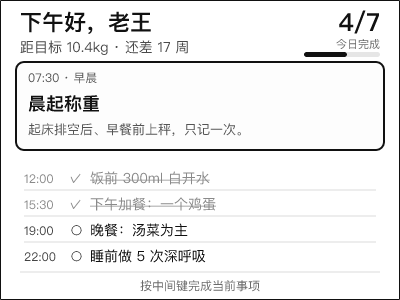
The preview is the author’s 400×300 sample task screen, not our device photograph. Source and deployment documentation were reviewed. The README still marks device display and Mini Program UI verification as pending; we have not tested hardware either. Original project code is MIT-licensed.
¶ Sports Board Pro
Author: Taqula lee · NOTE4
Football fixtures, recent results, featured matches and dynamic F1 pages for monochrome NOTE4. Updates every 10 minutes and refreshes only when content changes. Supports button navigation, voice Q&A and confirmed team changes; voice features require additional environment setup.
Requirements: Monochrome NOTE4 · Firmware 3.7.2 / SDK 0.1.0 · Always-on Linux host · Rust / Python 3.12 · Your own Chinese font
- Fixtures, results and featured events; F1 appears around race week, with 3–5 dynamic pages
- Fetches sports data every 10 minutes and refreshes the visible screen only when content changes
- Button navigation and hold-to-record; common questions are handled locally and open-ended questions use Hermes
- Manage followed teams with confirmation for voice changes; includes a time-limited Hangzhou Marathon page
The deployment guide targets Linux and NOTE4, not NOTE4C. Clone the official SDK separately beside the project. Keep the host running on the same LAN and close other clients using the device.
Setup and details: GitHub · Author guide · Developer page
Review boundary: Source and demo reviewed · Device and voice validation pending (2026-10-29)
Voice dependencies and author-specific paths need additional setup. Its temporary 2026 Hangzhou Marathon page expires at 12:00 on 2 November 2026, Beijing time.
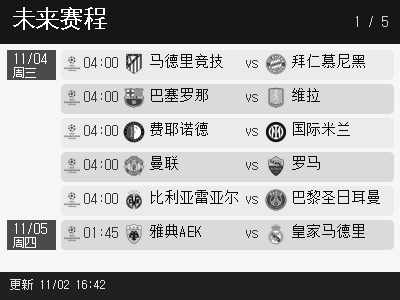
Preview reused from the Developer catalog; see its source and verification notes.
¶ Qimen Dunjia Chart
Author: 灵翎 · NOTE4
Generate 400×300 nine-palace charts for NOTE4 from a NAS / Docker host, with time-based charts, random sexagenary draws, period navigation and saved charts. Optional MiniMax recognition, interpretation and speech are available in code; the author still records unresolved hardware audio checks.
Requirements: Monochrome NOTE4 · SDK-matched firmware 3.7.2 · Linux NAS / Docker Compose · Same LAN · Optional MiniMax API key
- Nine-palace chart and stem-branch information with default sixteen-level grayscale text
- Short press to draw a chart, up/down to change periods; snapshots and Q&A are saved on the host
- Optional MiniMax recognition, interpretation and speech; hardware voice validation is incomplete
The author targets NOTE4 only, not NOTE4C. The container uses host networking; Node handles charts and service logic, while a Rust bridge calls the bundled SDK. Sixteen-level grayscale is the default. Keep the host running and stop other device clients before connecting.
Setup and details: GitHub · Author guide · Developer page
Review boundary: Chart preview verified · Hardware voice validation pending (2026-10-28)
The earlier review recorded 20 of 21 Node tests passing; voice playback and long-press recording still need device validation.
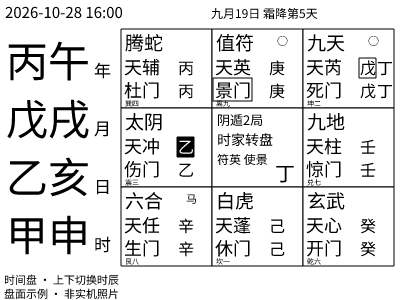
Preview reused from the Developer catalog; see its source and verification notes.
¶ WorkBuddy Pet
Author: 消逝の青春 · NOTE4
A NOTE4 pixel pet for WorkBuddy. Running on Windows, it follows local tasks, shows status, progress and context usage, and plays alerts when confirmation is needed or work finishes.
Requirements: Windows 10/11 x64 · WorkBuddy · Monochrome NOTE4 · SDK-compatible firmware · Same LAN
- Pixel pet shows working, waiting, completed and error states
- Task checklist progress and context usage, with button-based task selection
- Connects when tasks are active and releases the device after a grace period
The author currently specifies SDK 0.1.0 and firmware 3.7.2. NOTE4C is unsupported; macOS/Linux are unverified. This is a continuously running desktop app, not firmware. We reviewed public documentation only; Windows installation and device operation were not independently tested.
Setup and details: GitHub · Author guide · Developer page
Review boundary: After installation, check the actual result on your device (2026-10-27)
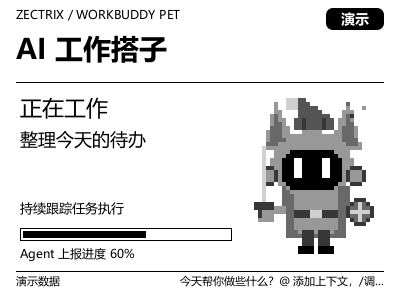
Preview reused from the Developer catalog; see its source and verification notes.
¶ EInk-Push
Author: moyubyte · NOTE4
A NOTE4 push service for a NAS or always-on computer, with web management and an HTTP API. Six bundled apps cover Today, vocabulary, meal ideas, a life guide, a pet and jiaobei divination, with images, audio and device-button interaction.
Requirements: NOTE4 LAN v1 · Node.js 22+ · Compatible NAS or computer · Chinese font · Same LAN · Host must stay running
- Six bundled apps: Today, vocabulary, meal ideas, life guide, pet and jiaobei
- Configure devices and apps in a browser; use HTTP to send images, play audio and receive status and events
- Monochrome, four-level and sixteen-level grayscale output matched to device capabilities
- Bundled vocabulary and spaced repetition, with online read-aloud and optional spoken spelling
- Switch apps with device buttons; settings, learning progress and pet state are saved on the host
An independent Node.js protocol implementation aligned with the official Rust SDK. It is not device firmware and does not require a separate Rust SDK installation. The NAS must support dependencies such as sharp and canvas; processor and OS compatibility require verification. Exit Hub, InkHub or other clients using the same NOTE4 before connecting.
Setup and details: GitHub · Author guide · Developer page
Review boundary: After installation, check the actual result on your device (2026-10-27)
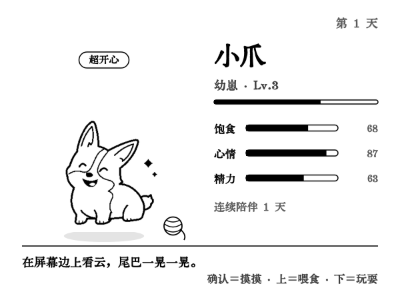
Preview reused from the Developer catalog; see its source and verification notes.
¶ InkHub
Author: strincake · NOTE4
Manage multiple content sources for NOTE4. Switch by priority, display duration and expiry, then return to persistent content after temporary tasks. Includes a Codex companion, local gallery, and desktop notes and clock.
Requirements: NOTE4 LAN push · Windows installer; other platforms require building and adaptation · Same LAN · Host must stay running
- Five priority levels, minimum display time, content expiry and persistent fallback
- Connect through the original-SDK gateway, HTTP API or Python plugins
- Bundled Codex companion, multi-folder gallery, desktop notes and clock
- Manage the live queue in a browser and select monochrome, four or sixteen gray levels per source
This is a local computer application, not device firmware. Exit other programs using NOTE4 before connecting. The author notes that original-SDK integration, HTTP-SDK integration and audio forwarding have not been thoroughly tested on hardware; other operating systems are not guaranteed to work out of the box.
Setup and details: GitHub · Author guide · Developer page
Review boundary: After installation, check the actual result on your device (2026-10-25)
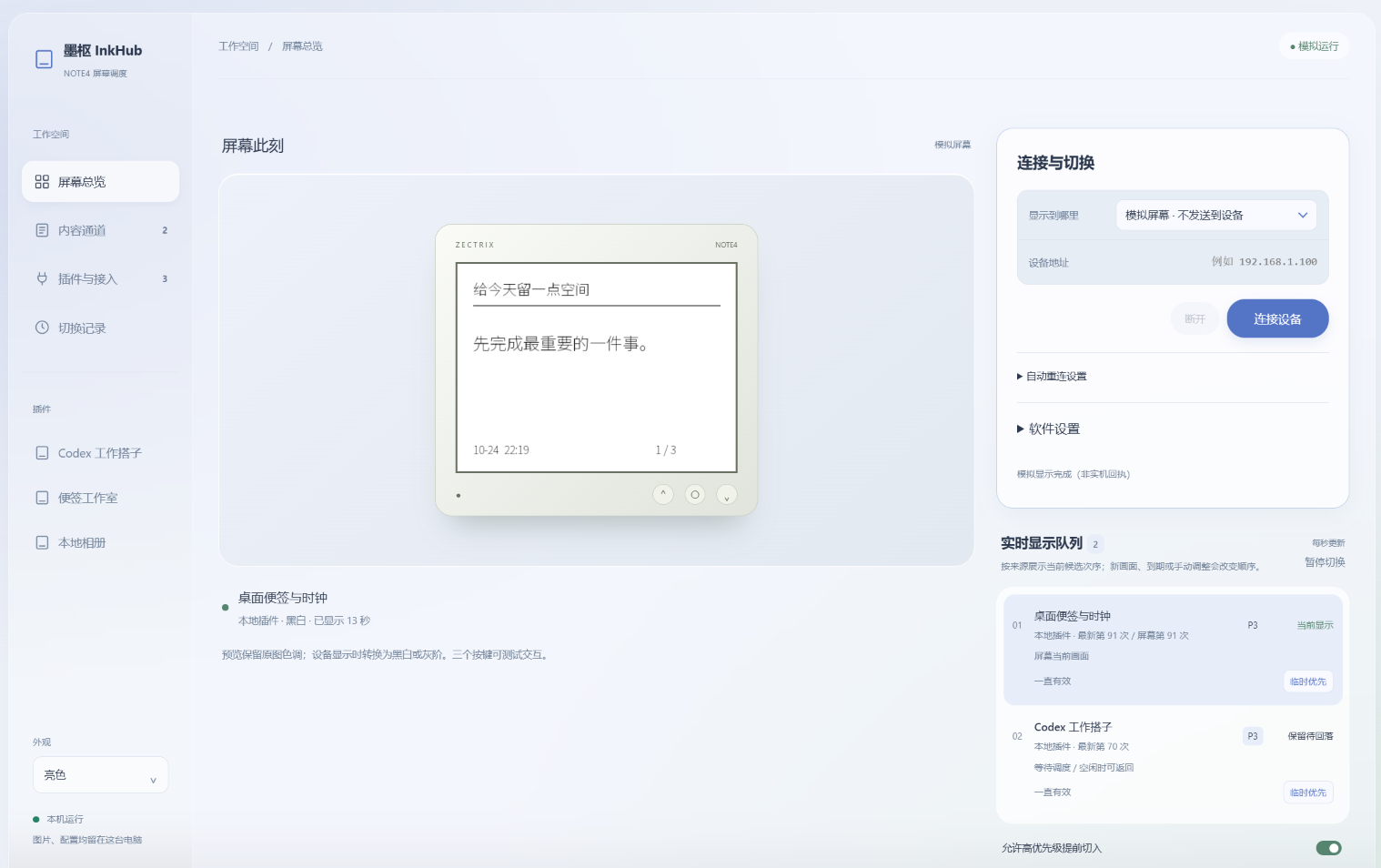
Preview reused from the Developer catalog; see its source and verification notes.
¶ Mowen Desk
Author: hadronliu · NOTE4
Turn NOTE4 into a desktop voice notepad and Mowen activity reader: hold confirm to speak, release to create a note, and use the buttons to browse followed activity, interactions and local voice-note records.
Requirements: NOTE4 firmware 3.7.2 · macOS · Rust / CMake · Mowen Pro API key · Same LAN · Host must stay running
- Hold confirm for one second to record; release to create a Mowen note
- Optional AI transcription and text cleanup; without AI, upload audio attachments only
- Browse followed authors’ posts, likes, comments, bookmarks and new followers
- Keep local note records; browse with buttons and confirm local deletion
Audio upload currently uses macOS afconvert; other systems require transcoding adaptation. The main activity feed needs the signed-in Mowen desktop client and mocli. NOTE4 only; stop Hub, WeRead Ink or other programs using the same device connection before starting.
Setup and details: GitHub · Author guide · Developer page
Review boundary: After installation, check the actual result on your device (2026-10-24)
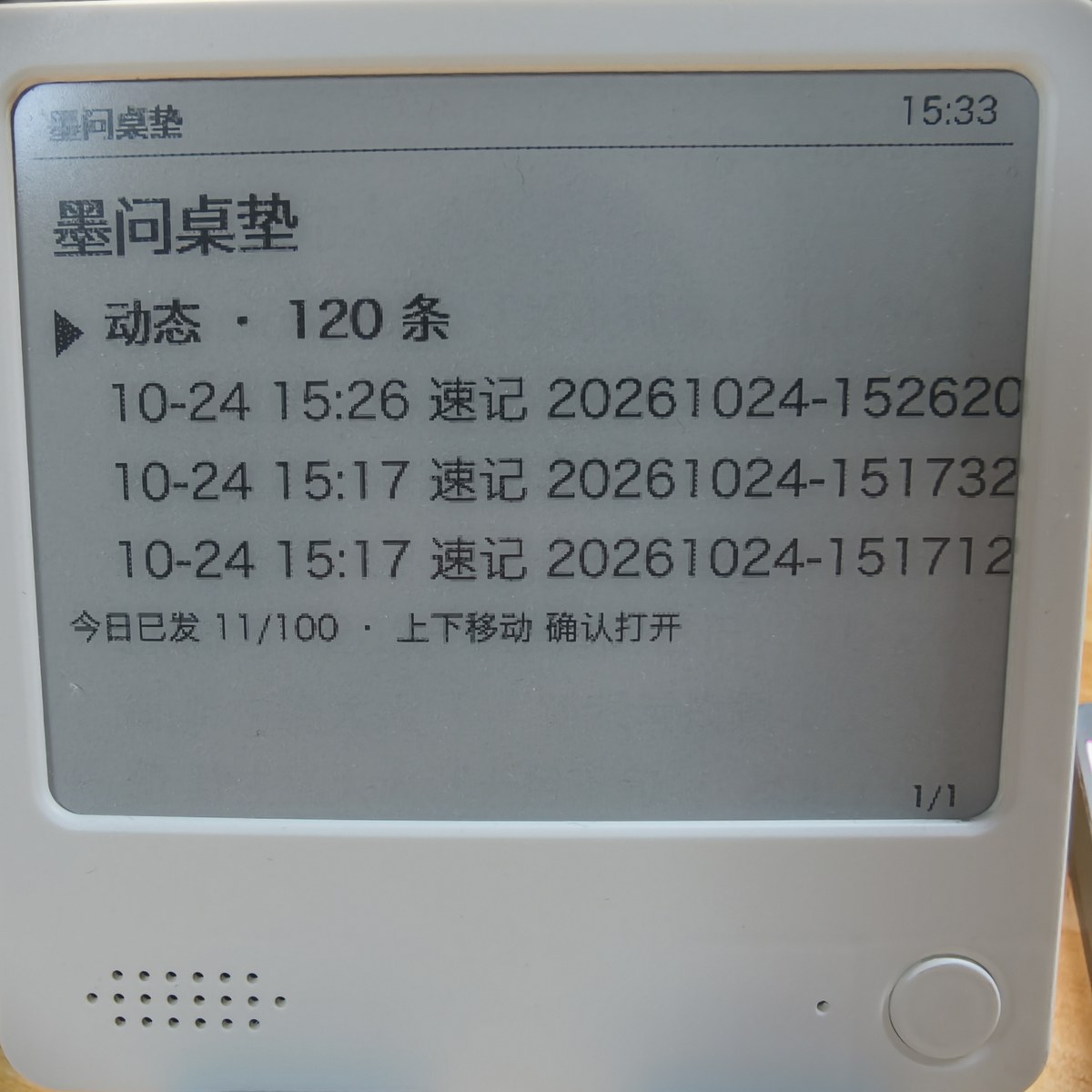
Preview reused from the Developer catalog; see its source and verification notes.
¶ MoDu · WeRead Ink
Author: hadronliu · NOTE4
Keep your WeRead reading activity on your desk: today’s reading time, daily totals for the week and current book progress on a 400×300 pixel-style panel, refreshed on NOTE4 every 30 minutes by default.
Requirements: NOTE4 firmware 3.7.2 · Rust stable / CMake · WeRead API key · Same LAN · Host must stay running
- Reading time for today and this week, reading days and a seven-day chart
- Up to two current books with progress and cumulative reading time
- 400×300 panel with pixel-style Chinese text and four grayscale levels by default
- Updates every 30 minutes by default, with a persistent connection and reconnection support
The author reports device validation on Apple Silicon macOS; Linux and Windows are unverified. For NOTE4 only, not NOTE4C. Daemon mode holds the device management connection; stop Hub or other senders using the device before starting.
Setup and details: GitHub · Author guide · Developer page
Review boundary: After installation, check the actual result on your device (2026-10-24)
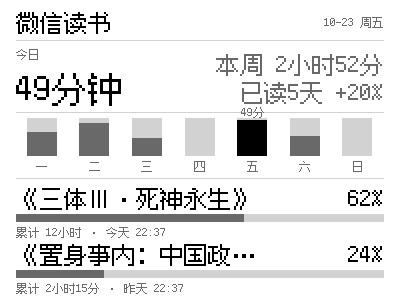
Preview reused from the Developer catalog; see its source and verification notes.
¶ Personal AI Assistant Status Display
Author: JerryLiu · NOTE4
A desktop companion display for personal AI assistants: progress, model, connection, daily spending and balance, plus seven-day stats, scheduled tasks and recent conversations.
Requirements: NOTE4 · macOS + Python 3 · Rust / CMake · Same LAN · Computer must stay running
- Progress, model, connection, battery, daily spending and balance
- Four pages: overview, seven-day stats, scheduled tasks and recent conversations
- Up/down to change pages; confirm to refresh data
- Local Hermes state or JSON supplied by any assistant
The author reports validation on Apple Silicon macOS; Windows and Linux are unverified. Reads local Hermes data or JSON from other assistants. Sample data is shown when real data is unavailable.
Setup and details: GitHub · Author guide · Developer page
Review boundary: After installation, check the actual result on your device (2026-10-22)
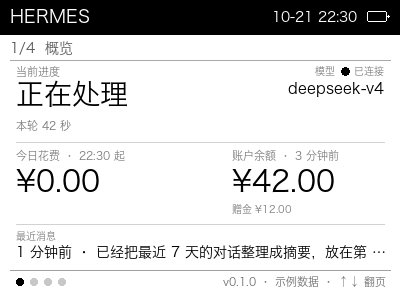
Preview reused from the Developer catalog; see its source and verification notes.
¶ Manila Icon Weather
Author: wuyinyuanye · NOTE4
Turn NOTE4 into a 16-level grayscale weather display with temperature, feels-like, humidity, highs and lows, six-hour and seven-day forecasts, and physical-button page switching.
Requirements: NOTE4 firmware 3.7.2 · Python 3.10+ · Rust / CMake · Same LAN · Host must stay running
- 16-level grayscale weather illustrations, temperature, feels-like, humidity and highs/lows
- Six-hour and seven-day forecast overview
- Hourly updates by default and two pages controlled by physical buttons
- Local control page for preview, connection and disconnect; no weather API key required
The author has validated Apple Silicon macOS. Linux instructions are provided without Linux device validation; Windows requires adaptation. Dates and forecast timezone currently use Asia/Shanghai; other timezones require code changes.
Setup and details: GitHub · Author guide · Developer page
Review boundary: After installation, check the actual result on your device (2026-10-22)
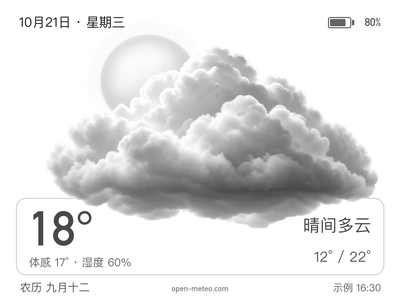
Preview reused from the Developer catalog; see its source and verification notes.
¶ NAS Gallery
Author: itopinion · NOTE4
Randomly choose portraits from a NAS photo folder, fill NOTE4 in sixteen shades of gray, and show the capture date.
Requirements: Local Push SDK · macOS 15+ / Apple Silicon · NAS share
- Filter portraits locally; skip screenshots and scenery without people
- Full-screen 400×300 Gray16 photos with capture dates
- Automatic slideshow, device-button navigation and pause
- Prepared small frames, bounded cache and offline NAS browsing
Portrait selection in the original gallery uses macOS Vision and currently requires macOS 15+ / Apple Silicon. Using the SDK does not remove this requirement; other systems need separate adaptation.
Setup and details: GitHub · Author guide · Developer page
Review boundary: After installation, check the actual result on your device (2026-10-20)

Preview reused from the Developer catalog; see its source and verification notes.
¶ Liquid Glass Weather
Author: itopinion · NOTE4
Generate Chinese or English glass-style weather cards with temperature, feels-like temperature and a three-day forecast. The current version previews and exports images on your computer first.
Requirements: Local Push SDK · Python 3.10+ · WeatherAPI Key
- Weather and city display in Chinese and English
- Temperature, humidity, wind and a three-day forecast
- 400×300 continuous-grayscale PNG
- Local cache and offline status
SDK builds and local tests have been verified on Apple Silicon macOS. Windows and Linux require platform validation, and each plugin’s runtime dependencies may need adaptation.
Setup and details: GitHub · Author guide · Developer page
Review boundary: After installation, check the actual result on your device (2026-10-20)
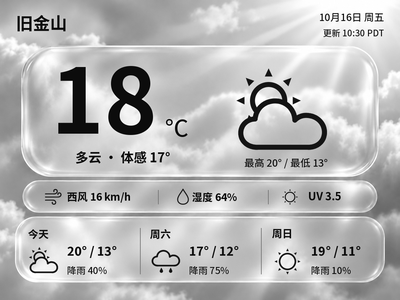
Native render from the current repository, 400×300 grayscale, using fixed sample weather. It is not a live observation or proof of physical-device output.
¶ Vocabulary
Author: itopinion · NOTE4
Practice vocabulary by textbook and unit: view hints, spell letters and read words on NOTE4, then listen to model pronunciation.
Requirements: Local Push SDK · Word lists · Local ASR / TTS · NOTE4
- Manage and import word lists by textbook and unit
- Chinese hints and letter-by-letter spelling practice
- Whole-word reading and model pronunciation
- Local recognition, speech synthesis and learning progress
SDK builds and local tests have been verified on Apple Silicon macOS. Windows and Linux require platform validation, and each plugin’s runtime dependencies may need adaptation.
Setup and details: GitHub · Author guide · Developer page
Review boundary: After installation, check the actual result on your device (2026-10-20)
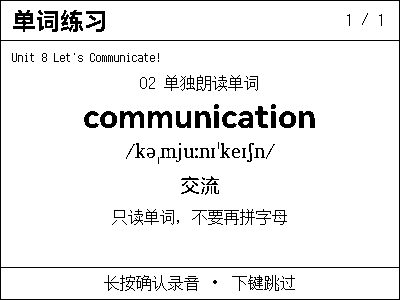
Native local-app output using the test word apple and synthetic samples. It does not verify a real person's pronunciation.
¶ Codex Pet
Author: itopinion · NOTE4
Let a pixel companion on your desk follow Codex tasks: working, waiting for attention, completed or failed, all at a glance.
Requirements: Local Push SDK · Local Agent status · NOTE4
- Follow local Codex task status
- Multiple task lists and manual page turns
- Pixel-pet animation and status sounds
- Other Agents can actively report status
SDK builds and local tests have been verified on Apple Silicon macOS. Windows and Linux require platform validation, and each plugin’s runtime dependencies may need adaptation.
Setup and details: GitHub · Author guide · Developer page
Review boundary: After installation, check the actual result on your device (2026-10-20)
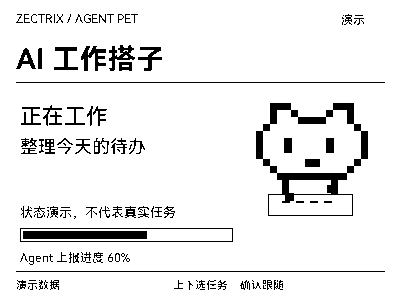
Native app demo screen · 400×300
¶ AI Daily
Author: itopinion · NOTE4
Collect AI news daily, read summaries and listen to briefs on NOTE4, and revisit past content saved on your computer.
Requirements: Local Push SDK · News sources · Optional summarization and speech
- Multiple sources, deduplication and daily scheduled updates
- Summaries with local Codex or Ollama
- Read with device buttons; optional read-aloud
- Chinese/English settings and past-brief archives
SDK builds and local tests have been verified on Apple Silicon macOS. Windows and Linux require platform validation, and each plugin’s runtime dependencies may need adaptation.
Setup and details: GitHub · Author guide · Developer page
Review boundary: After installation, check the actual result on your device (2026-10-20)
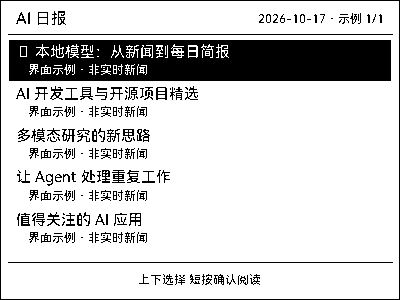
Native app interface · Sample headlines, not live news · 400×300