¶ Plugins for the Official Firmware
This section features open-source projects built on the official firmware API.
Data collected: May 31, 2026 (original ranking stars last updated at 16:54 on May 31, 2026; newly added project data updated on August 11, 2026)
¶ Third-Party Clients
| Rank | Project | Developer | Stars | Language | Category | Link |
|---|---|---|---|---|---|---|
| 1 | zectrix-desktop | will-17173 | 15 | Rust/TypeScript | Desktop client | GitHub |
| 2 | zectrixPCTools | twinkle10010 | 5 | TypeScript | Desktop client | GitHub |
| 3 | android_sticky_note | passheep | 1 | Kotlin | Android client | GitHub |
¶ Content Push Plugins
| Rank | Project | Developer | Stars | Language | Category | Link |
|---|---|---|---|---|---|---|
| 1 | resoukanban | yaoxinxionic | 19 | Python | Information push | GitHub |
| 2 | zectrix_calendar_sync | defia | 9 | Python | Calendar sync | GitHub |
| 3 | zectrix-skill | kkkdkk | 7 | Python | LLM Skill | GitHub |
| 4 | astrbot_plugin_zectrix | zhangkai542322 | 6 | Python | AI chatbot integration | GitHub |
| 5 | zectrix-nas-photos | ZECTRIX Lab — Tao | 6 | Python | NAS photo sync | GitHub |
| 6 | zectrix_news | twinkle10010 | 5 | Python | Information push | GitHub |
| 7 | ReminderScreenSync | justinfjx | 4 | Swift | Apple ecosystem sync | GitHub |
| 8 | claude-eink-bridge | BarryBarrywu | 4 | TypeScript/Python | Claude Code HUD dashboard | GitHub |
| 9 | dida_todo_zectrix_sync | xgjia (Xiaoguang) | 3 | Python | Third-party to-do sync | GitHub |
| 10 | astrbot_plugin_daily_card | zhangkai542322 | 3 | Python | AI chatbot integration | GitHub |
| 11 | nihility | nihilityer | 2 | Rust | Full-stack personal assistant | GitHub |
| 12 | zectrix-eink-market-dashboard | xiaoxuan353 | 1 | Python | A-share sector market skill | GitHub |
| 13 | TickerPaper | wanglz111 | 0 | Python | Market dashboard | GitHub |
| 14 | zectrix-microsoft-todo-sync | ZECTRIX Lab (itopinion) | 0 | JavaScript | Microsoft To Do sync | GitHub |
| 15 | codex-zectrix-dashboard | BarryBarrywu | 0 | Rust | Codex status dashboard | GitHub |
| 16 | zectrix-friday-weather | leosongyyy | — | Python | Mood and weather / Agent Skill | GitHub |
¶ Third-Party Clients
¶ 1. zectrix-desktop — Desktop Client for ZECTRIX Note 4
Developer: will-17173
Last updated: 2026-05-07
Highlights:
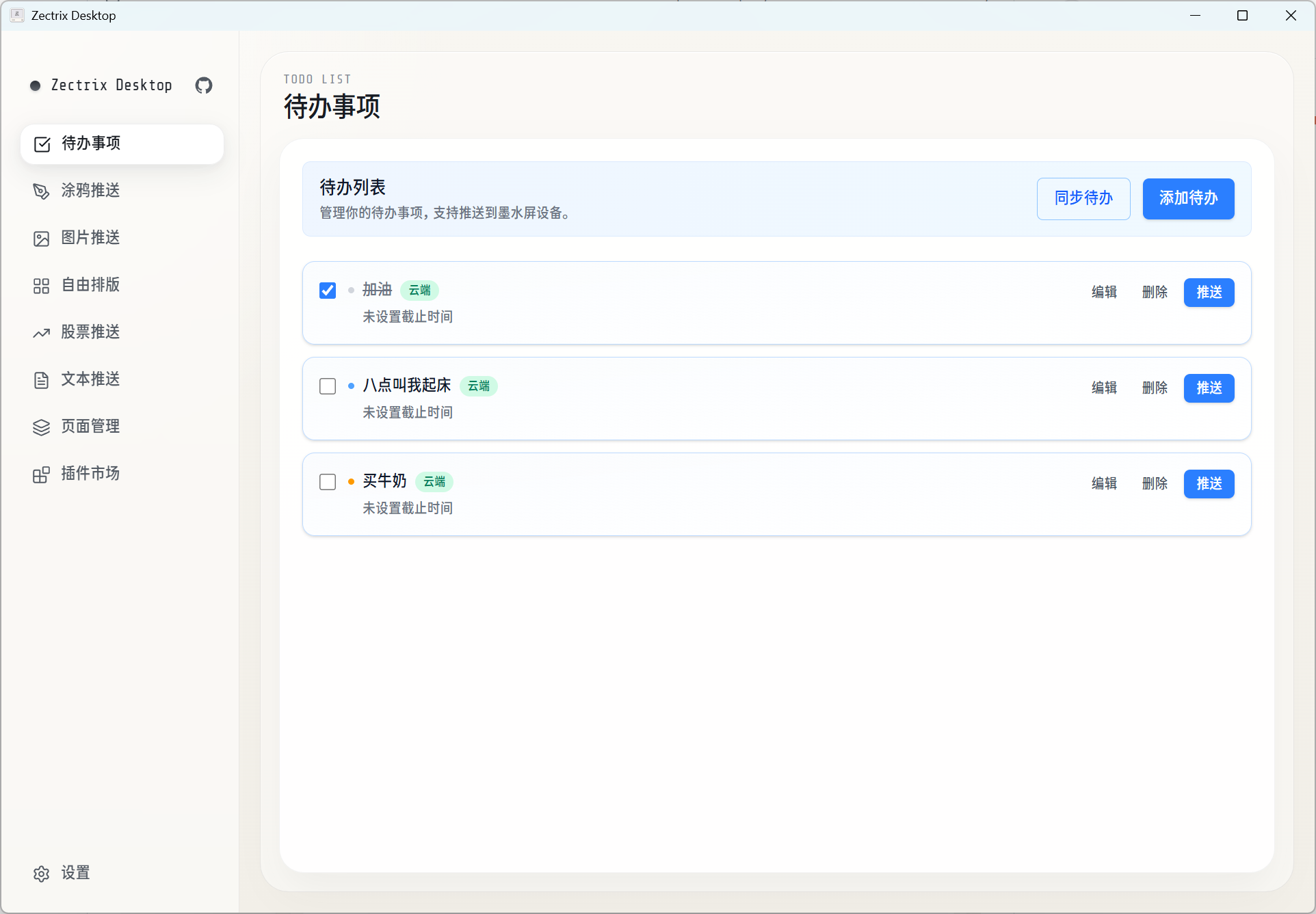
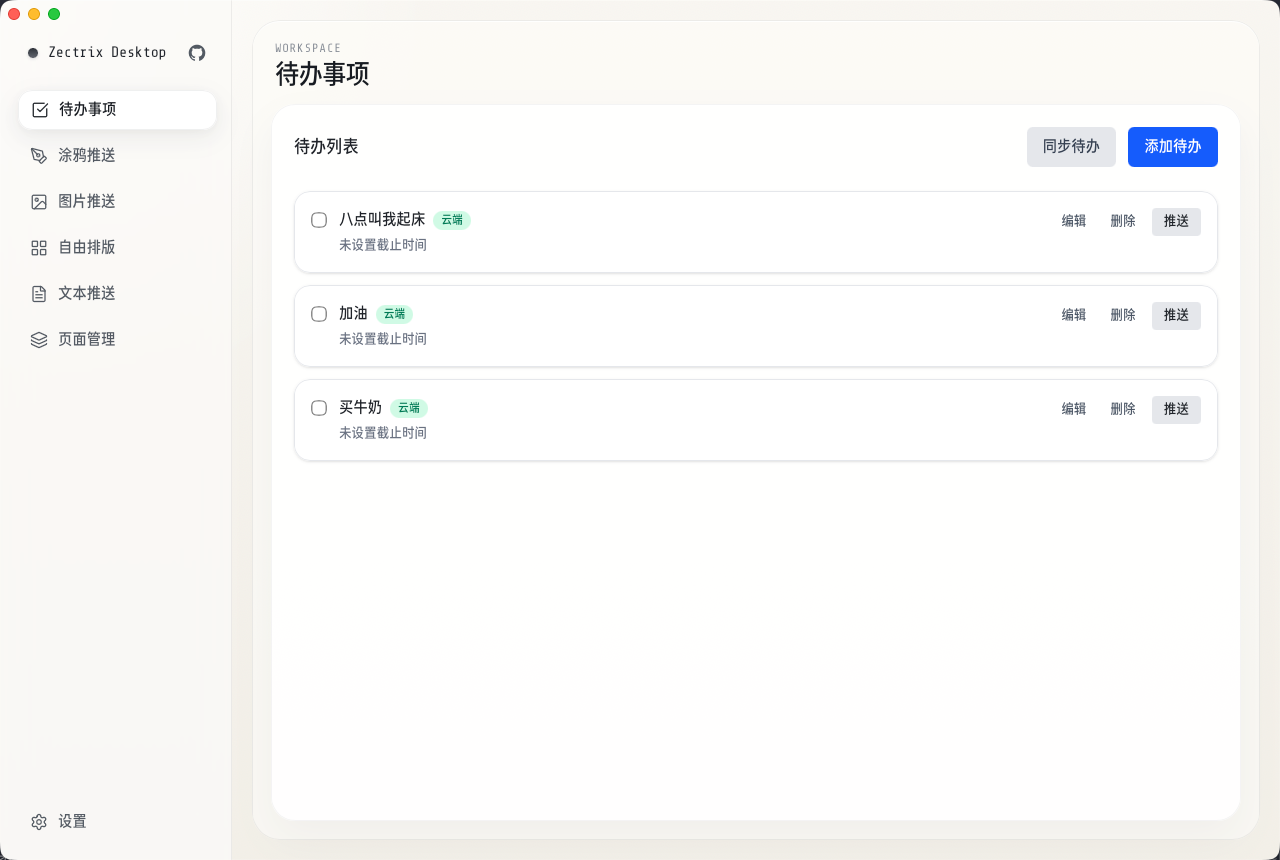
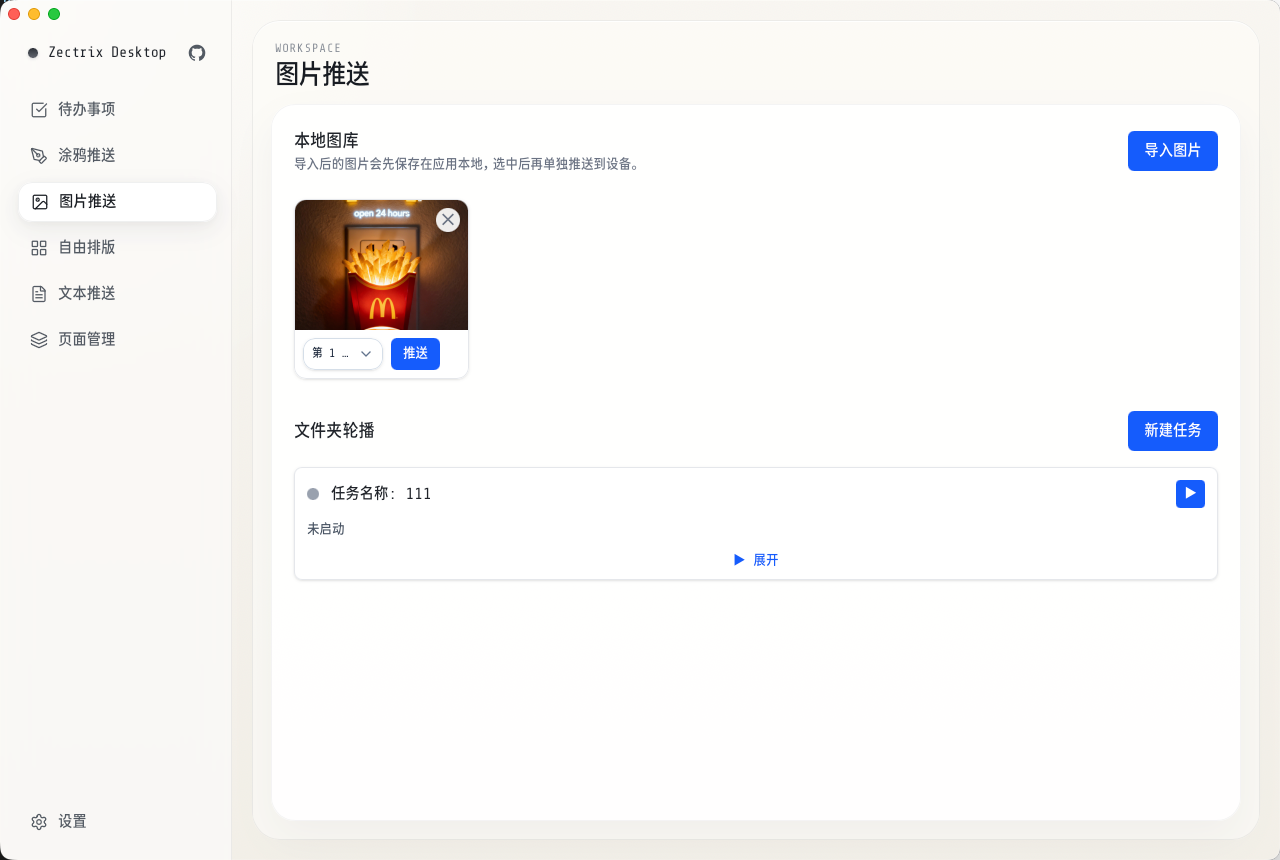
- Local-first architecture: To-do data is stored locally first, supports offline operations, and can be synchronized manually to the cloud
- Apple Calendar sync: To-dos can be synchronized with macOS Calendar events or Reminders, with two-way sync support (macOS only)
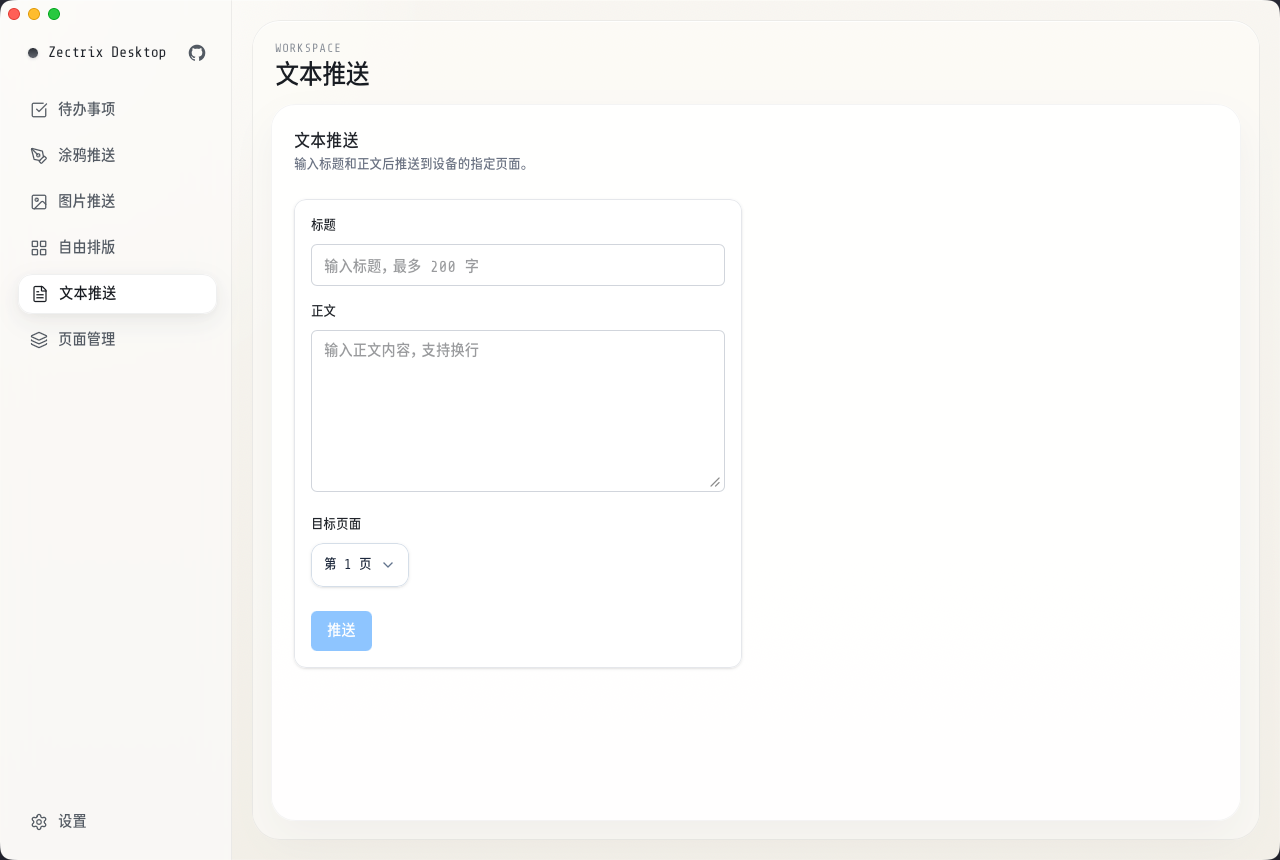
- Multiple content types: Push text, images, doodles, and other content to the e-paper display
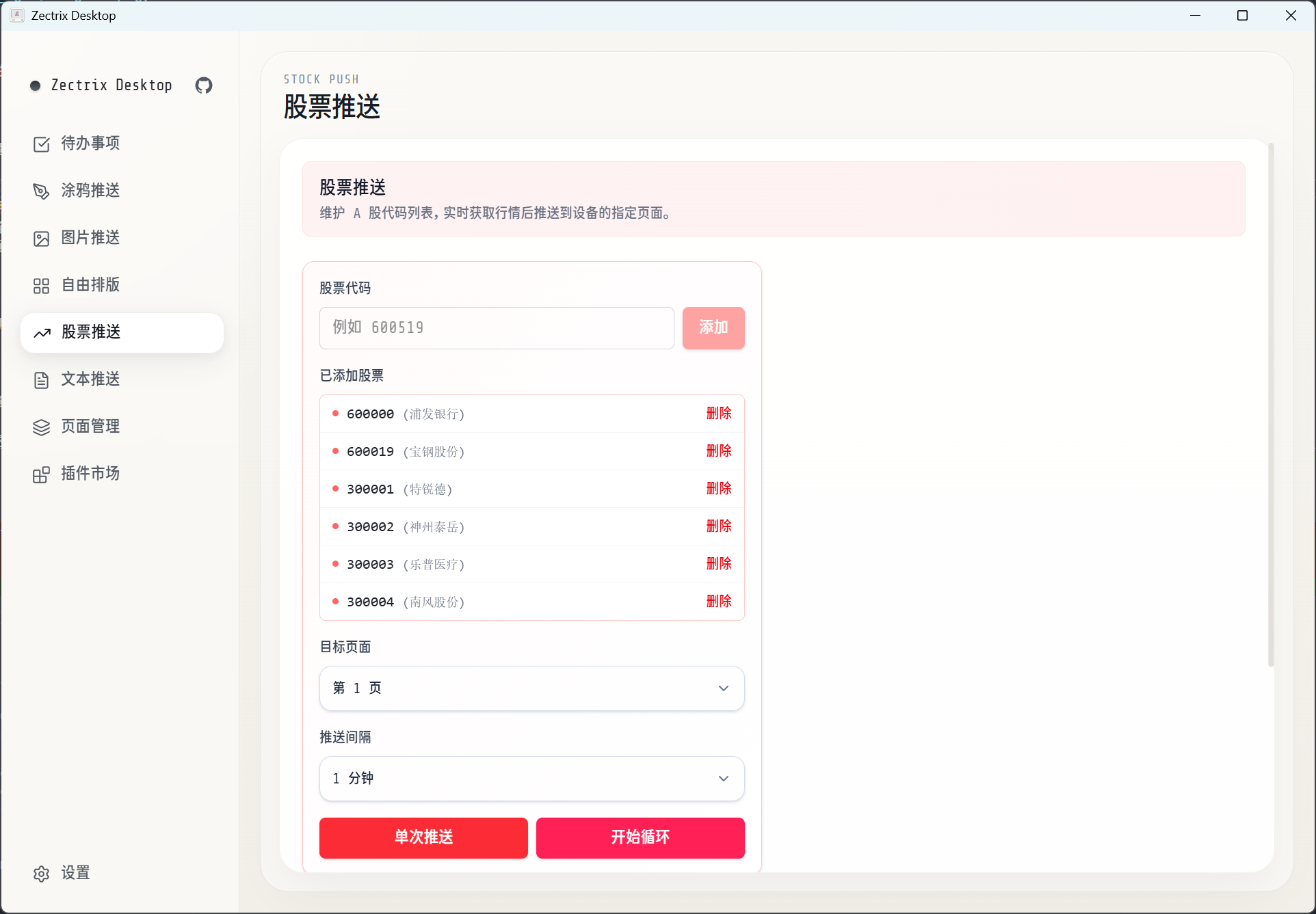
- Stock-market push: Real-time monitoring of China A-share prices with scheduled, recurring updates
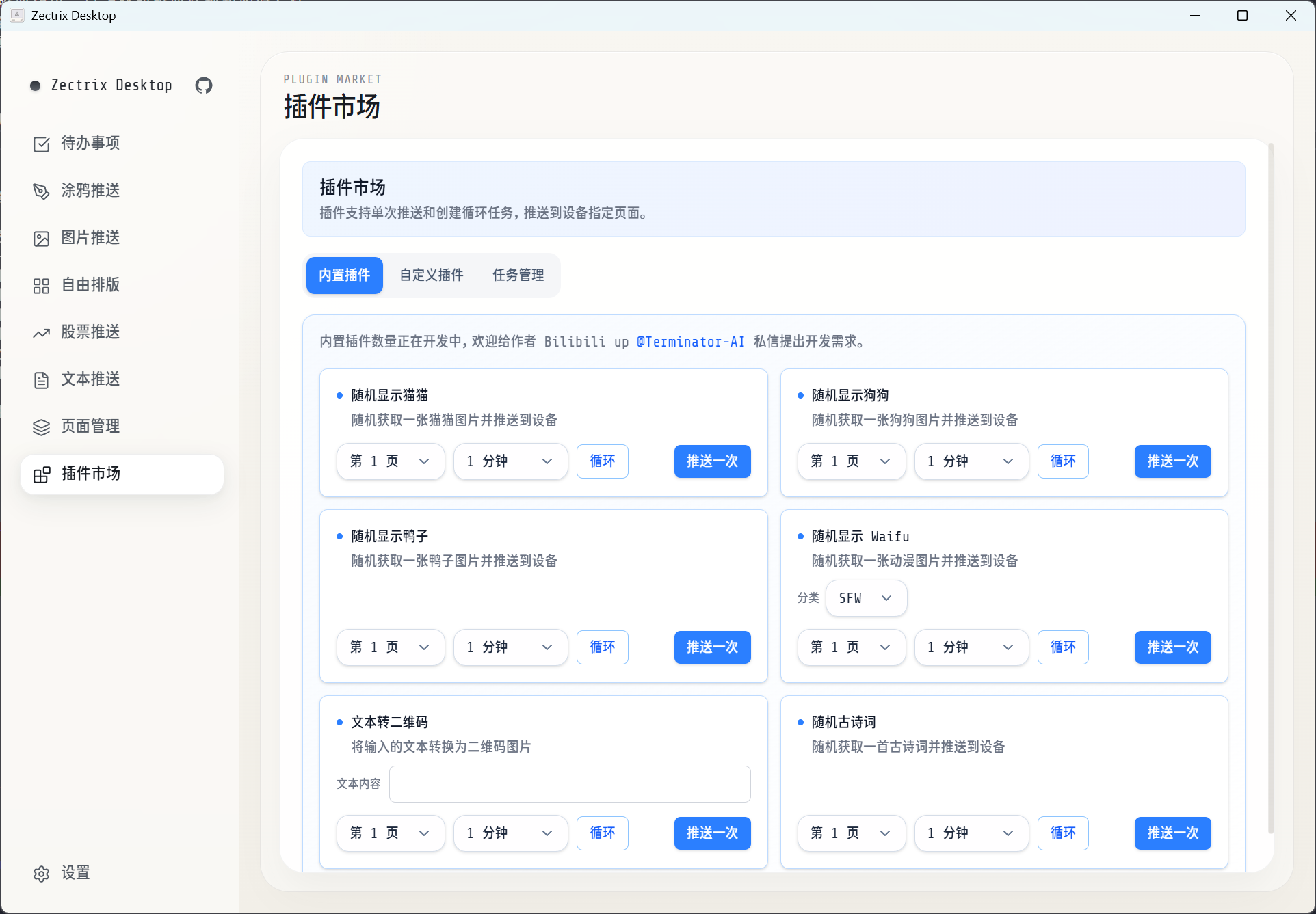
- Plugin marketplace: Includes selected plugins and supports custom JavaScript plugins, with recurring-task automation
- Folder slideshow: Automatically cycles through images in a folder at a configured interval
- Device management: Binds devices by MAC address and caches device information locally
- Secure storage: Stores the API Key with operating-system-level Keyring encryption
- Cross-platform: Supports Windows, macOS, and Linux (built with Tauri 2)
Project repository: https://github.com/will-17173/zectrix-desktop
Preview:
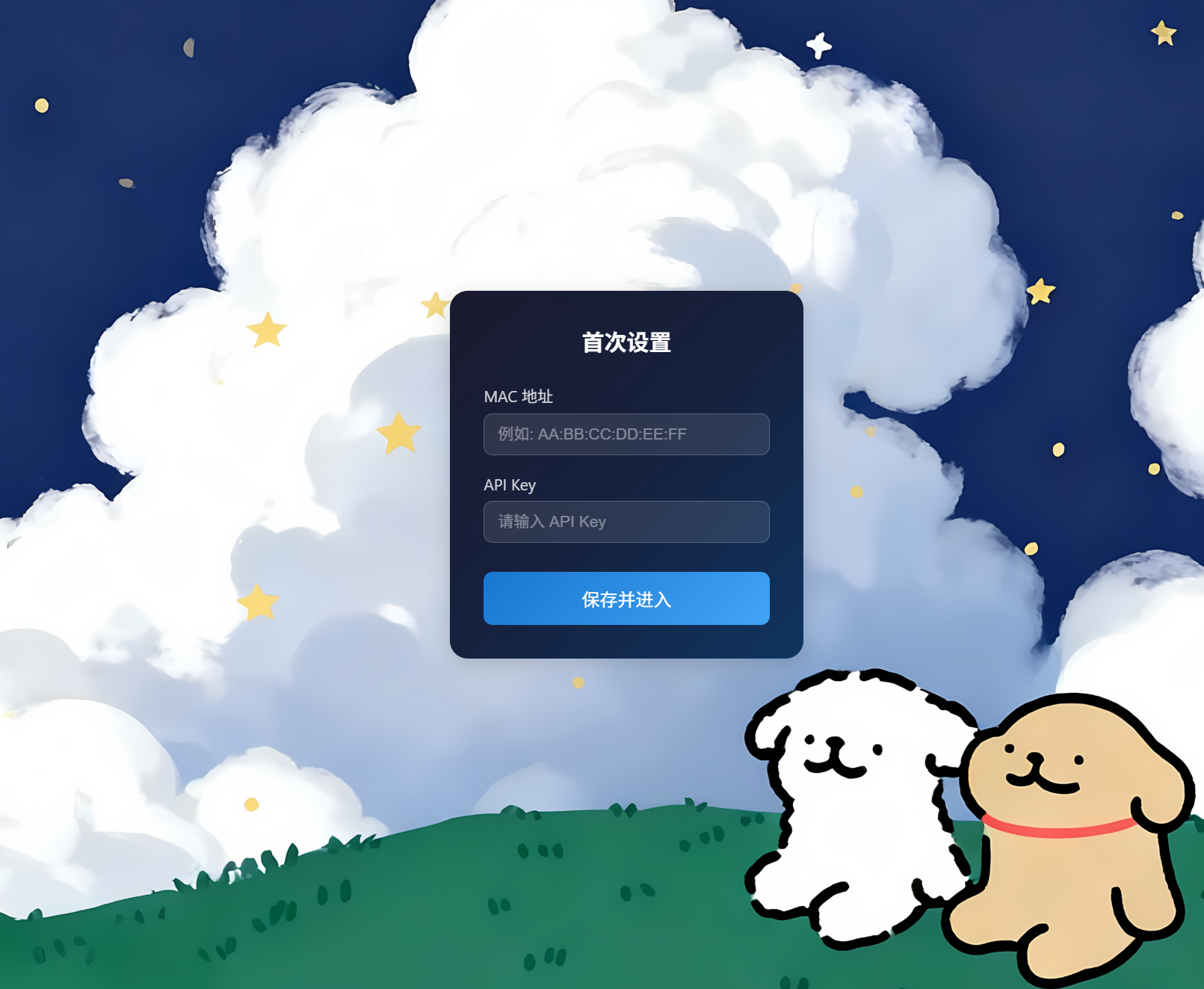
¶ 2. zectrixPCTools Desktop To-Do Manager
Developer: twinkle10010
Last updated: 2026-04-20
Overview:
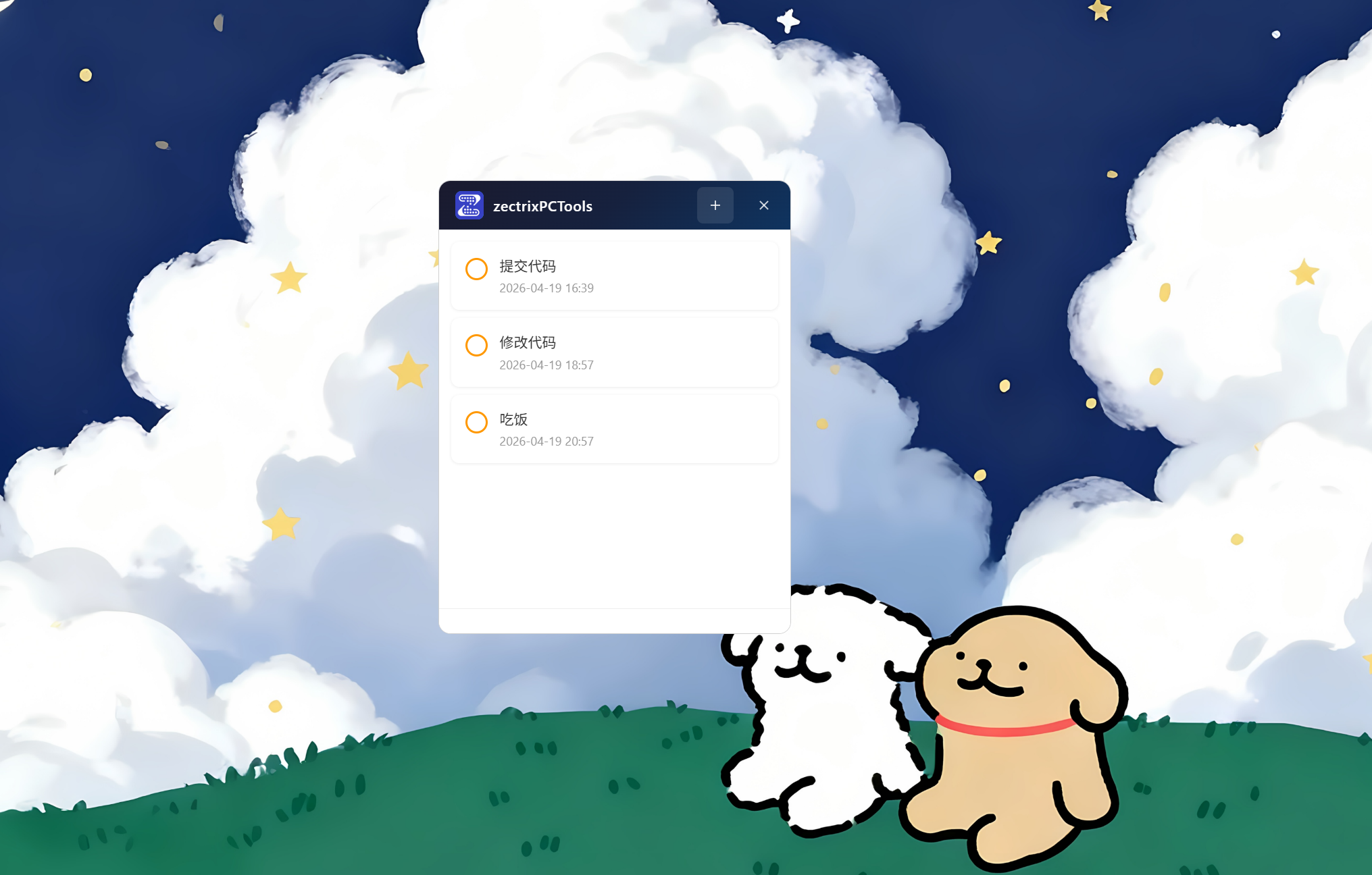
A desktop to-do management tool built with Neutralinojs, with real-time synchronization to ZECTRIX Cloud (cloud.zectrix.com).
Highlights:
- Keyboard shortcut: Press Alt+C to open the main window instantly
- To-do management: Create, edit, complete, and delete items; double-click a title to edit it quickly, or use the context menu to delete it
- Priority support: Low, medium, and high priorities
- Cloud synchronization: Synchronizes data with ZECTRIX Cloud through the API
- Desktop integration: Borderless transparent window, always-on-top support, draggable window, and background hiding on close
Project repository: https://github.com/twinkle10010/zectrixPCTools
Preview:
¶ 3. android_sticky_note — View and Sync To-Dos on Android
Developer: passheep
Last updated: 2026-04-28
Overview:
An Android to-do manager (Kotlin + Jetpack Compose) designed for use with ZECTRIX e-paper devices and ZECTRIX Cloud. It retrieves to-dos through the ZECTRIX Cloud API, creating lightweight synchronization between the app, a home-screen widget, and the e-paper display.
Core features:
- To-do list: create, edit, delete, complete, and mark incomplete
- Cloud synchronization: retrieve and update data through the ZECTRIX Cloud Open API
- Home-screen widget: display and scroll through the to-do list, refresh manually, and mark items complete
- Widget styles: light, dark, or follow system settings
- Background refresh: scheduled synchronization using AlarmManager + WorkManager
Technology stack: Kotlin, Jetpack Compose, Material 3, MVVM, Hilt, Retrofit, Room
Project repository: https://github.com/passheep/android_sticky_note
¶ Content Push Plugins
¶ 1. NewsNow-Style Dashboard for ZECTRIX E-Paper Displays (resoukanban)
Developer: yaoxinxionic
Last updated: 2026-04-21
Overview:
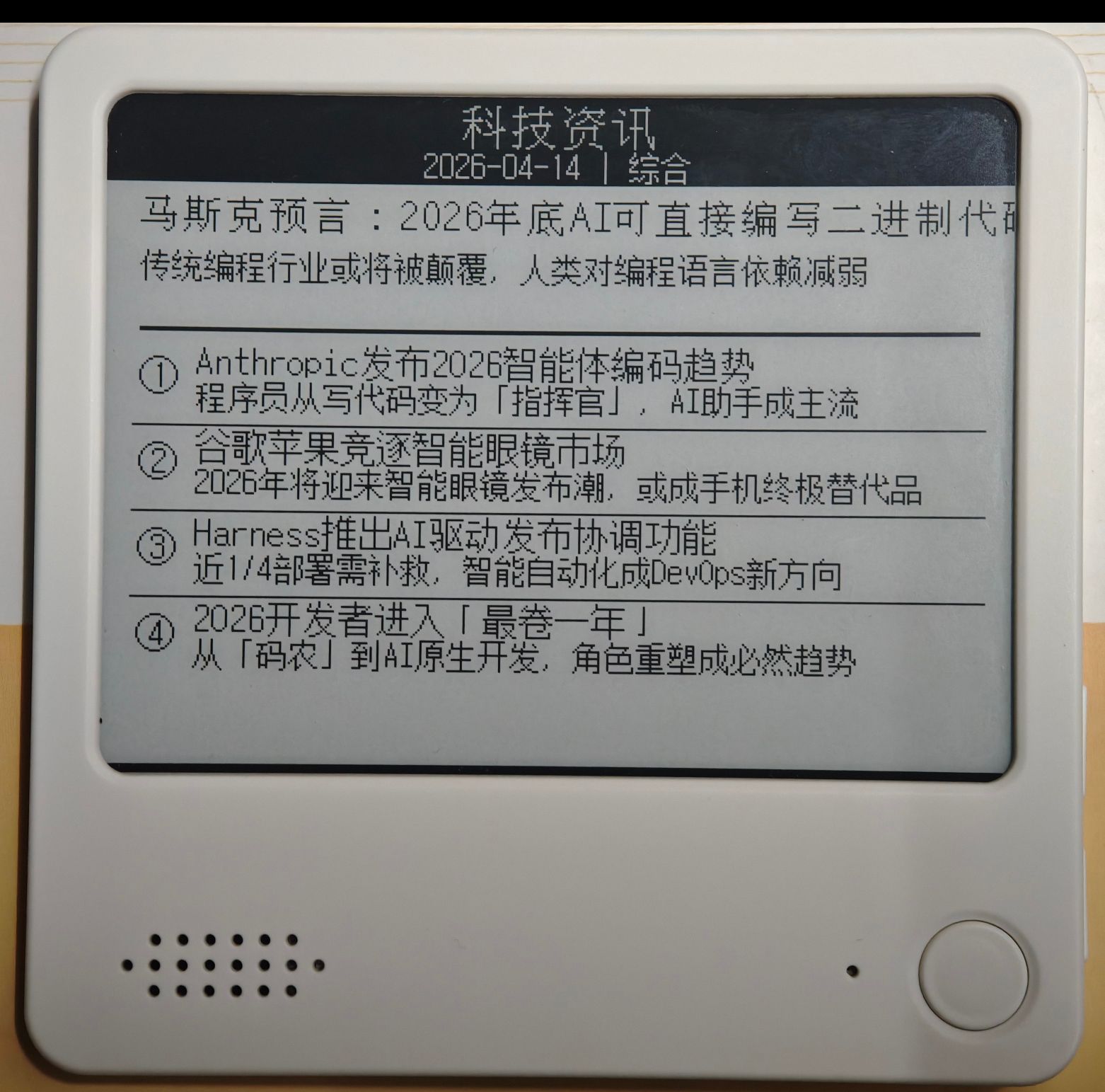
Uses GitHub Actions to automatically push a daily dashboard to ZECTRIX e-paper displays. Inspired by the clean NewsNow design, it provides trending topics, the traditional Chinese calendar, and weather information without requiring a server.
Highlights:
- Pages 1 & 2: trending lists from multiple sources (Zhihu, Bilibili, and GitHub), with freely selectable sources
- Page 3: Gregorian calendar + traditional Chinese calendar / solar terms / holidays
- Page 4: comprehensive weather information, including current temperature and humidity, forecast, and clothing suggestions
- Weather data is provided by Amap for accurate forecasts
- Completely free; no self-hosted server required
Project repository: https://github.com/yaoxinxionic/resoukanban
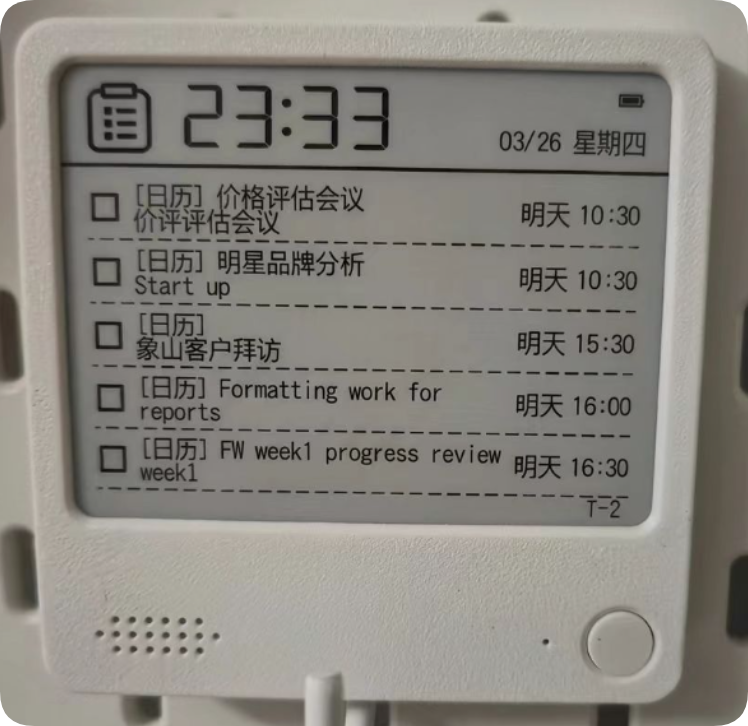
¶ 2. Calendar Synchronization System
Developer: defia
Last updated: 2026-03-31
Highlights:
- Automatic synchronization: Seamless connection to CalDAV calendar services
- Two-way synchronization: Real-time exchange between device and calendar data
- Smart management: Automatically marks expired items and applies intelligent filtering to keep the interface tidy
Project repository: https://github.com/defia/zectrix_calendar_sync
Preview:
¶ 3. ZECTRIX Sticky Note Control Skill (zectrix-skill)
Developer: kkkdkk
Last updated: 2026-04-11
Overview:
A Python Skill based on the ZECTRIX Open API that can directly control display content and to-dos on ZECTRIX Sticky Note devices through scripts or an LLM (large language model).
Highlights:
- Device management: Retrieve the device list, automatically select among multiple devices, and save the selection when only one device is available
- Display control: Push plain text, structured title-and-body content, or images to the device screen
- Page management: Clear a specified page or all pages at once
- To-do operations: Retrieve, create, update, complete, mark incomplete, and delete to-dos
- LLM integration: Suitable for large-language-model workflows that control the device through natural language
Project repository: https://github.com/kkkdkk/zectrix-skill
¶ 4. ZECTRIX Sticky Note AstrBot Plugin (astrbot_plugin_zectrix)
Developer: zhangkai542322
Last updated: 2026-04-14
Overview:
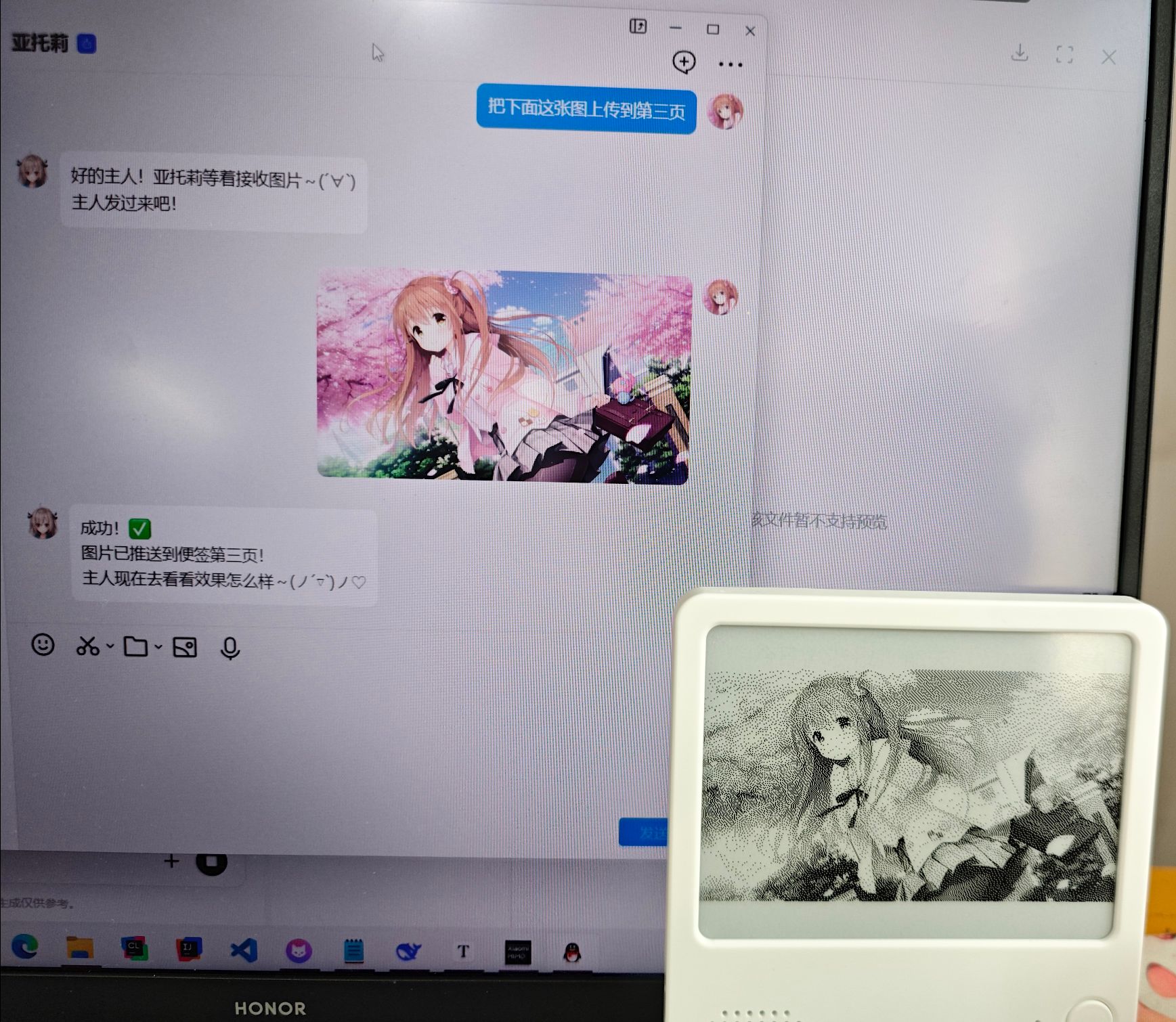
An unofficial AstrBot plugin for interacting with ZECTRIX Lab AI to-do list hardware through natural-language commands. It supports LLM-based intent parsing and automatic execution.
Highlights:
- Device management (view the device list)
- To-do CRUD (create, retrieve, update, delete, complete / mark incomplete, and filter)
- Display push (text / title and body / image / clear page)
- Execute natural-language commands (using an LLM to parse intent and run the corresponding action)
- Visual configuration through WebUI
- Highly extensible; can be called in a chain by other plugins
Project repository: https://github.com/zhangkai542322/astrbot_plugin_zectrix
Preview:
¶ 5. Simple NAS Photo Synchronization Script
Developer: ZECTRIX Lab — Tao
Last updated: 2026-04-15
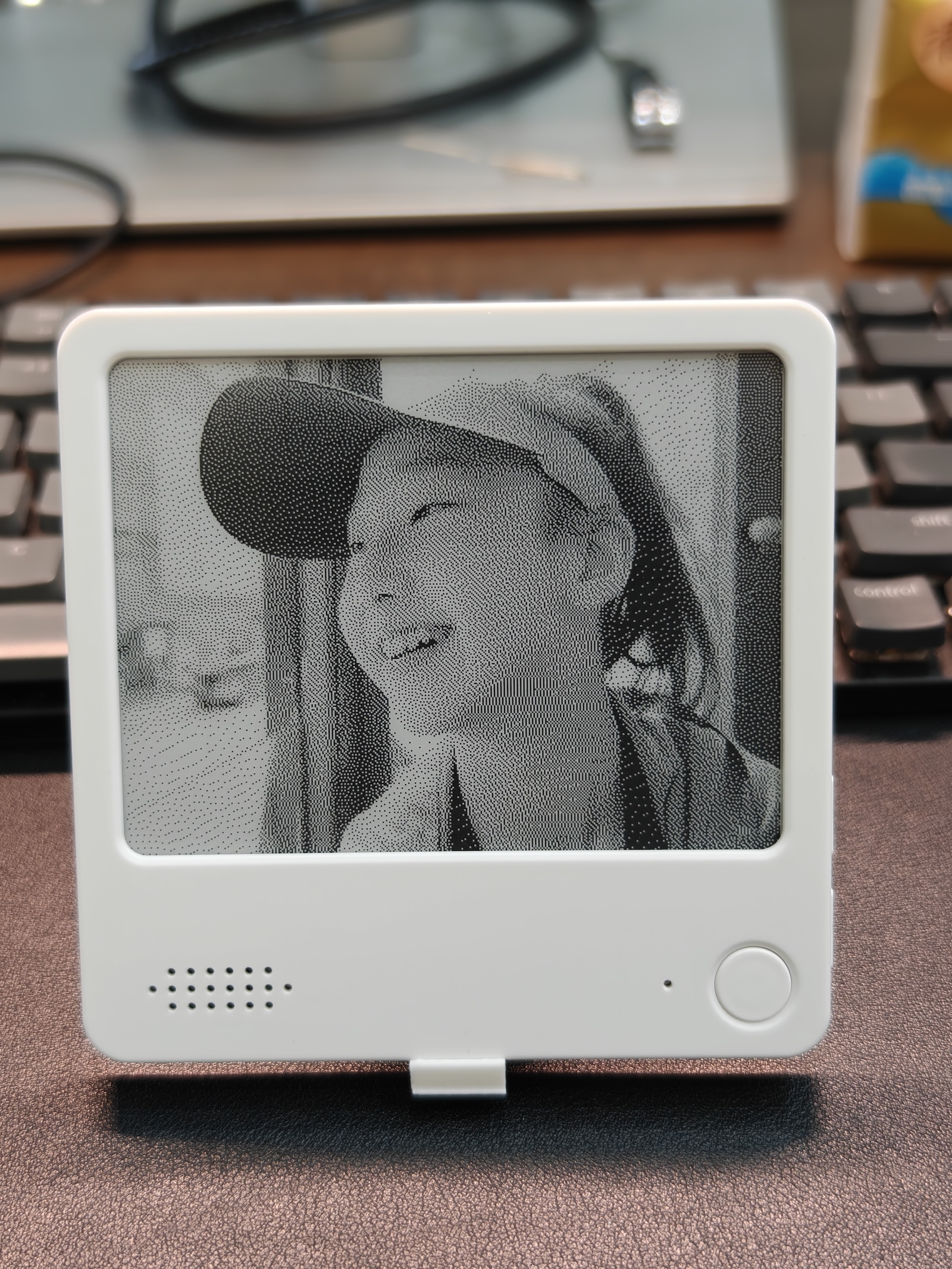
Highlights:
- Simple deployment: A local Python script for NAS that connects Synology Photos with the e-paper display
- EXIF filtering: Reads low-level EXIF metadata to exclude Synology
@eaDirthumbnails and push only actual photos - A trip through time: Uses a “select the year first, then select a photo” approach to find old photos within ±10 days of the current date, giving memories from every year a fair chance to appear
- E-paper layout: LANCZOS proportional cropping plus a date badge in the lower-right corner for a vintage e-paper look
- Automation: Supports scheduled execution through Synology Task Scheduler
https://github.com/itopinion/zectrix-nas-photos
Preview:
¶ 6. zectrix_news — Daily Trending-Topic Push
Developer: twinkle10010
Last updated: 2026-04-15
Overview: Automatically retrieves trending lists from Weibo, Toutiao, and Cailian Press and pushes them to an e-paper device.
Core features:
- Weibo Top 10 trending topics (pageId: 1)
- Toutiao Top 10 trending topics (pageId: 2)
- Cailian Press Top 10 real-time topics (pageId: 3)
- Displays the update time for every item
- Refreshes automatically every 10 minutes
- Includes a Linux daemon script (start/stop/restart)
Project repository: https://github.com/twinkle10010/zectrix_news
¶ 7. Two-Way Apple Reminders Synchronization (ReminderScreenSync)
Developer: justinfjx
Last updated: 2026-04-12
Overview:
A native macOS app (SwiftUI) that provides two-way synchronization between Apple Reminders and a ZECTRIX AI Sticky Note device.
Highlights:
- Merge multiple lists: Synchronize multiple Apple Reminders lists to the same device
- Change monitoring: Apple-side change monitoring plus device-side polling enables real-time two-way synchronization
- Smart matching: Automatically matches items with unique titles; applies a conservative strategy to duplicate titles
- Complete data synchronization: Two-way synchronization of to-do title, notes, date, time, priority, and completion status
- Recurring-rule support: Basic daily, weekly, monthly, and yearly recurrence rules
- Safety protection: Prevents accidental deletion of overdue or completed items, device-deletion conflicts, and ID reuse conflicts
Project repository: https://github.com/justinfjx/ReminderScreenSync
The project is under active development and may contain bugs. Trial use and feedback are welcome.
¶ 8. claude-eink-bridge — Claude Code E-Paper HUD Dashboard
Developer: BarryBarrywu
Last updated: 2026-05-09
Overview:
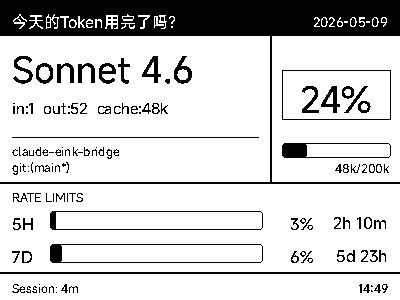
A hardware extension bridge for Claude HUD that synchronizes Claude Code's live terminal status—including token usage, current model, and context utilization—to a ZECTRIX e-paper display, creating a delightfully geeky physical AI desktop dashboard. Currently supports macOS only.
Highlights:
- Invisible companion process: Non-invasive design; wakes automatically when Claude Code opens and shuts itself down 10 minutes after Claude Code closes
- Zero SSD wear: All image rendering happens in memory streams, with no temporary files created
- Aggressive flood prevention: Built-in 30-second disk cooldown and hash filtering ensure network requests are sent only when data changes
- Multiple-session tracking: Tracks multiple Claude Code terminals at once and displays the most recently active project
- Information-rich dashboard: Model name, project/branch, context progress bar, API quota usage and countdown, and session duration
- Custom configuration: Greeting, font, push page ID, and other settings are customizable
- One-command installation: Includes an
install.shinstallation script
Preview:
Project repository: https://github.com/BarryBarrywu/claude-eink-bridge
¶ 9. dida_todo_zectrix_sync
Developer: xgjia (Xiaoguang)
Last updated: 2026-04-16
Overview:
A Python script that synchronizes TickTick to-dos to the e-paper cloud to-do API through a webcal/ics subscription URL.
Project features:
- Retrieves TickTick ICS on a schedule (compatible with both VTODO and VEVENT)
- Synchronizes create, update, complete, and delete operations to the cloud to-do API
- Persists state locally to prevent duplicate creation
- Uses only the Python standard library, with no third-party dependencies
Project repository: https://github.com/xgjia/dida_todo_zectrix_sync
¶ 10. Daily Card AstrBot Plugin (astrbot_plugin_daily_card)
Developer: zhangkai542322
Last updated: 2026-04-15
Overview:
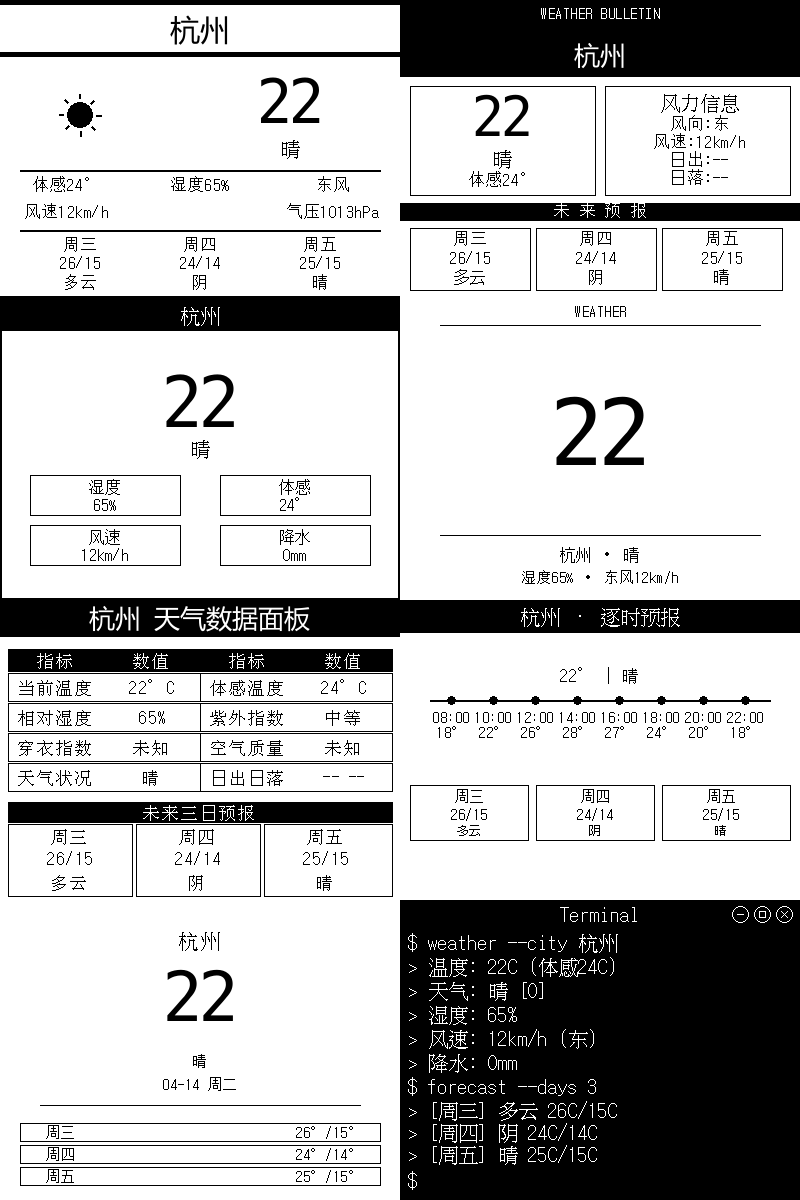
An LLM-driven daily card image-generation plugin—21 templates · 400 × 300 pure black and white · bundled Chinese font. Every feature is controlled by chatting with AI, and the plugin can call the ZECTRIX plugin in a chain to push the result to a device.
Highlights:
- 21 templates: weather × 8, schedule × 3, news × 2, custom × 4, aggregated × 2
- Automatic chained calls: after generating an image, the LLM automatically calls the push function
- Built-in Zfull bitmap font optimized for 1-bit e-paper displays
- Optional custom-font support
Project repository: https://github.com/zhangkai542322/astrbot_plugin_daily_card
Preview:
¶ 11. nihility Full-Stack Personal Assistant
Developer: nihilityer
Last updated: 2026-04-17
Overview:
A full-stack personal assistant system built with Rust. It focuses on making maximum use of context and integrates browser control, AI model inference, and edge-device connectivity with ZECTRIX Sticky Note.
Highlights:
- Browser control: Built-in Chromium browser-control module for automated web operations and information collection
- Edge-device integration: Real-time communication with ZECTRIX Sticky Note devices through the edge-protocol protocol
- AI model inference: Integrates ONNX Runtime for local model inference while remaining compatible with the OpenAI API
- Voice processing: Built-in VAD (voice activity detection) module
- Message-pool management: Intelligently manages messages from multiple sources for efficient context aggregation
- One-command Docker deployment: Includes Docker Compose configuration and works out of the box
Project repository: https://github.com/nihilityer/nihility
¶ 12. TickerPaper — E-Paper Market Dashboard
Developer: wanglz111
Last updated: 2026-05-28
Overview:
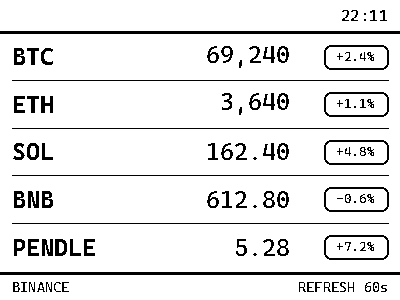
Pushes public Binance market data to a ZECTRIX e-paper display, creating a low-distraction desktop crypto price dashboard. Requires only Python 3 and a ZECTRIX API Key; no exchange API key is needed.
Highlights:
- Single-page price panel: Displays the latest USDT prices and 24-hour changes for BTC/ETH/SOL/BNB/PENDLE
- E-paper-friendly layout: 400 × 300 black-and-white image optimized for readability on a small display
- Automatic font handling:
font_path: autodownloads Cascadia Code automatically, with zero configuration - Local preview support:
python main.py --previewgenerates a preview image so you can confirm it before pushing - Continuous operation: Refreshes and pushes on the schedule specified by
interval_seconds - Secure design: Reads public market data only, never connects to a trading account, and excludes
config.jsonfrom Git by default
Project repository: https://github.com/wanglz111/TickerPaper
Preview:
¶ 13. zectrix-s3-epaper-4.2 — Xiaotieba Skill
Developer: Kulemao
Last updated: 2026-06-11
Overview:
Xiaotieba (ZECTRIX) smart sticky notes are 4.2-inch e-paper devices controlled through the cloud Open API. The skill supports configuring API credentials, managing the device list, pushing text and images, managing to-dos, designing 400 × 300 screen layouts, and setting scheduled push scenarios such as weather, class schedules, and reminders.
Highlights:
- Cloud API control: Configure credentials and the device ID/MAC through the Open API to manage devices remotely
- Multiple content formats: Push plain text, structured text, or images to pages 1–3
- To-do management: Manage to-dos in the cloud and synchronize them to the e-paper device
- E-paper layout design: Design short-text layouts specifically for 400 × 300 e-paper displays
- Scheduled push scenarios: Supports scheduled weather, class schedule, household reminder, meeting reminder, and other push scenarios
- Troubleshooting guidance: Provides diagnostic steps for issues such as “API succeeded but the device did not refresh,” “key truncated,” and “content too long”
- Credential-free design: The skill itself contains no real API keys, protecting user privacy and security
Project repository: https://skillhub.cn/skills/zectrixs3epaper
¶ 14. ZECTRIX Todo Sync — Two-Way Microsoft To Do Synchronization
Developer: ZECTRIX Lab (itopinion)
Last updated: 2026-07-20
Overview:
A local macOS tool for two-way synchronization between ZECTRIX Sticky Note to-dos and Microsoft To Do. It reads tasks from all Microsoft To Do lists, writes new Sticky Note tasks to a designated list, and maintains separate task mappings for multiple ZECTRIX devices.
Highlights:
- Two-way task synchronization: Synchronizes titles, notes, dates, times, and complete/incomplete status
- Multiple-device support: Configure multiple ZECTRIX devices with independent mappings; the same Microsoft task can be synchronized to each device separately
- Safe preview and automatic synchronization: Supports a dry-run preview that shows proposed actions without changing tasks, manual synchronization, and scheduled background synchronization
- List and date mapping: Reads all Microsoft To Do lists by default; writes new Sticky Note tasks to a designated list and prioritizes Reminder over Due Date when available
- Secure local storage: Stores the ZECTRIX API Key in macOS Keychain and encrypts the Microsoft sign-in cache; browser authorization uses PKCE and no Client Secret
- Conservative deletion policy: The test version does not propagate deletions between services, reducing the risk of accidental data loss
Requirements: macOS, Node.js 20 or later, and an Outlook, Hotmail, or global Microsoft 365 account that can use Microsoft To Do. Microsoft 365 operated by 21Vianet in China, a Windows GUI client, and an officially signed installer are not yet supported.
Project repository: https://github.com/itopinion/zectrix-microsoft-todo-sync
Preview:
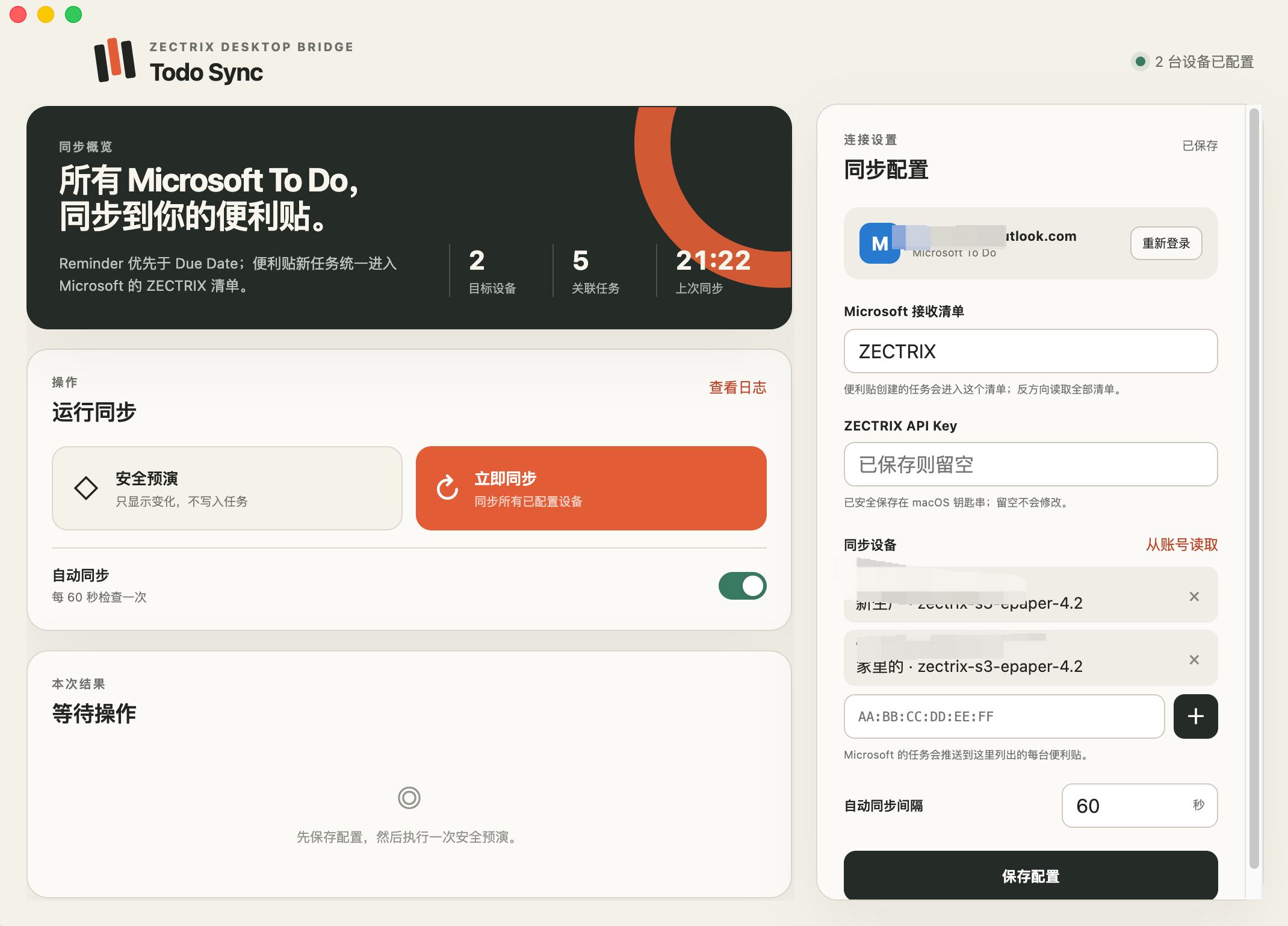
This is a development test version. Start with non-critical test tasks and confirm the direction and content in Safe Preview before running a live synchronization.
¶ 15. Zectrix E-Ink Market Dashboard — A-Share Sector Market Skill
Developer: xiaoxuan353
Last updated: 2026-07-31
Overview:
An AI-created market dashboard skill for ZECTRIX e-paper displays, designed primarily to track intraday changes across China A-share industry sectors and related indices / ETFs. It retrieves public quote data, renders a 400 × 300 pure black-and-white two-column dashboard, and can push the result to a ZECTRIX display.
Highlights:
- 14-item watchlist: Covers semiconductor, AI, 5G, PCB, renewable-energy, rare-metal, dividend-index, and other sector themes by default, sorted automatically by intraday percentage change
- Crisp e-paper output: Uses a 1-bit Mode 1 image and
dither=falsedirect push to reduce dithering noise and blurred text - 400 × 300 two-column layout: Uses a fixed pixel grid, SimSun typeface, and positive / negative change boxes for ZECTRIX handheld e-paper displays
- Scheduled automatic pushes: Refreshes every hour from 09:00 to 15:00 on Monday through Friday, with an extra update at 14:30; the watchlist can be edited in the script
- AI Agent compatible: Includes a standard
SKILL.mdfor use with AI Agents such as Antigravity, Cursor, and Claude - Cross-platform: Supports Windows, Linux, and macOS with Python 3.8+ and Pillow; the device MAC address and API Key are provided through environment variables
License: MIT
Project repository: https://github.com/xiaoxuan353/zectrix-eink-market-dashboard
Preview:
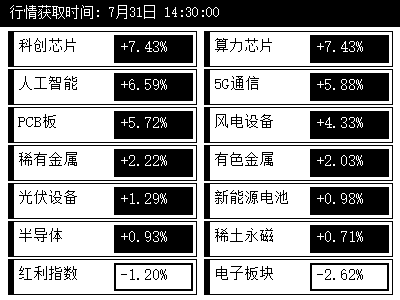
Quote data is retrieved from the public Sina Finance endpoint configured by the project and is provided for informational purposes only, not as investment advice. The current scheduler checks Monday through Friday only and does not automatically exclude public-market holidays.
¶ 16. codex-zectrix-dashboard — Codex Quota and Task Status Dashboard
Developer: BarryBarrywu
Last updated: 2026-08-11
Overview:
Reads Codex quota, reset timing, and recent task activity locally on macOS, then renders a 400 × 300 black-and-white dashboard for ZECTRIX NOTE4. The companion uploads a new image only when visible content changes and the push throttle permits it, making it suitable for a quiet, always-on physical AI status display.
Highlights:
- Quota at a glance: Shows quota remaining, percentage used, quota-window length, and reset time
- Recent task activity: Displays up to three tasks and distinguishes running, turn completed, failed, and interrupted states
- Read-only local collection: Reads quota through a standalone Codex
app-serverand receives execution events through hooks; it does not save or display prompts, responses, reasoning, tool arguments, plan text, or project paths - E-paper friendly: Produces a fixed 400 × 300 black-and-white PNG and pushes only when the image changes; if a data source is temporarily unavailable, it keeps the last state and marks it as potentially stale
- Privacy and key protection: Stores the API Key in macOS Keychain; Privacy Mode hides task titles, and setup shows a preview and upload boundary before the first push
- Plugin-based installation: The released plugin bundles the companion binary, so Python, Node.js, and Rust are not required separately
Installation:
codex plugin marketplace add BarryBarrywu/codex-zectrix-dashboard
codex plugin add codex-zectrix-dashboard@codex-zectrix-dashboard
After installation, run this in Codex:
$setup-zectrix-dashboard
Requirements: macOS, Codex, and ZECTRIX NOTE4. Other operating systems and display models are not currently supported, and the plugin cannot modify, control, or end Codex tasks.
License: MIT
Project repository: https://github.com/BarryBarrywu/codex-zectrix-dashboard
Device and raw-dashboard preview:
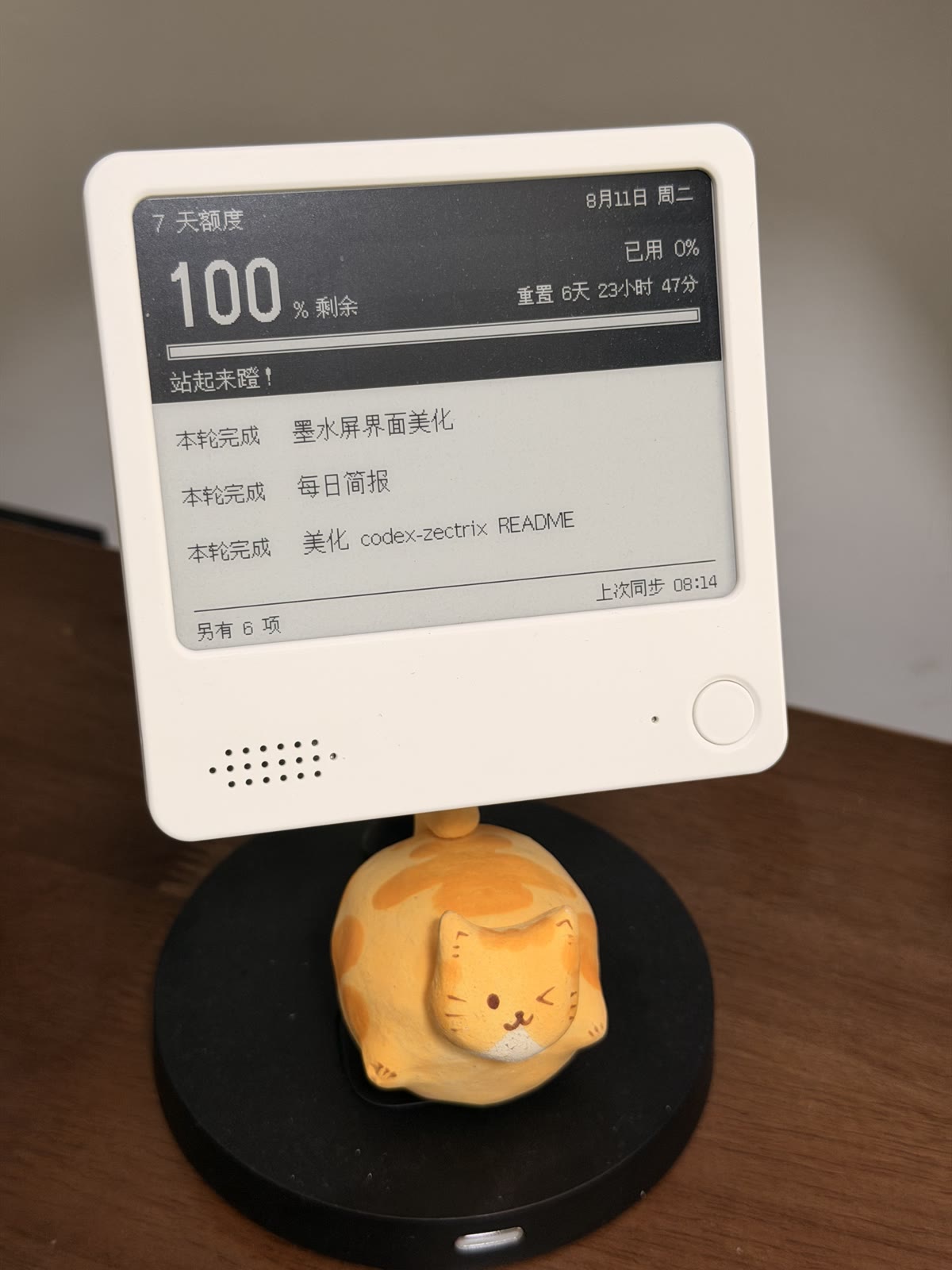
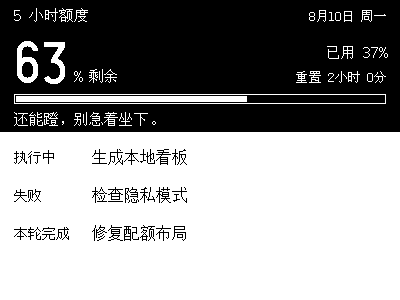
By default, task titles are included in the rendered image uploaded to ZECTRIX Cloud. Enable Privacy Mode when titles may contain sensitive information. Treat the ZECTRIX API Key like an account password: never paste it into chat or commit it to a repository.
¶ 17. zectrix-friday-weather — “Is It Friday Yet?” Mood and Weather Display
Developer: leosongyyy (community nickname: 远)
Added: 2026-09-06
Overview:
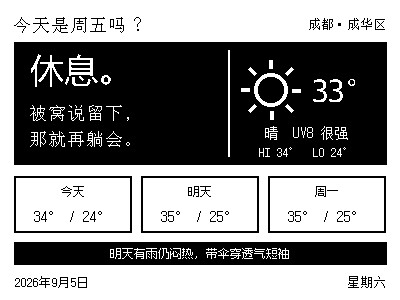
Generates a single-page dashboard combining playful daily messages with local weather for a Zectrix 400×300 monochrome e-paper display, then uploads it through the ZECTRIX Cloud Open API. The left column answers “Is it Friday yet?”, the right shows the weather, and the bottom provides a three-day forecast and practical clothing or travel tips.
Highlights:
- Messages that change with the day and time: Different messages and black/white themes for weekdays, Friday and weekends; a “退朝” stamp appears after 16:00 on Friday. Message pools can be extended
- Local weather at a glance: Temperature, weather icons, daily highs/lows, the day's maximum UV index and a three-day forecast, using Open-Meteo data
- Practical daily tips: Weather-based reminders for umbrellas, sun protection, extra layers and temperature changes
- Native monochrome layout: Produces a 400×300 black-and-white image with a bundled bitmap font and dithering disabled for uploads
- AI-assisted setup: Includes Agent Skill instructions and an interactive initialization wizard; also works as a Python script, with a preview-only mode before uploading
Requirements: Python 3, Pillow, a ZECTRIX API Key, device ID and location. The author specifies Zectrix 400×300 monochrome e-paper displays; consult future project documentation for compatibility with other models.
Getting started: Follow the repository README to install dependencies and configure the project with scripts/init.py, then run the rendering and upload script. Scheduled updates require a separately configured system task or automation. The device retrieves the new image on its next poll.
License: MIT. The author notes that the message content is intended for display on personal devices only. Message and time-based behavior concepts originate from eyaeya/today-is-friday.
Project repository: https://github.com/leosongyyy/zectrix-friday-weather
Preview (sample date and weather; Chinese display content):